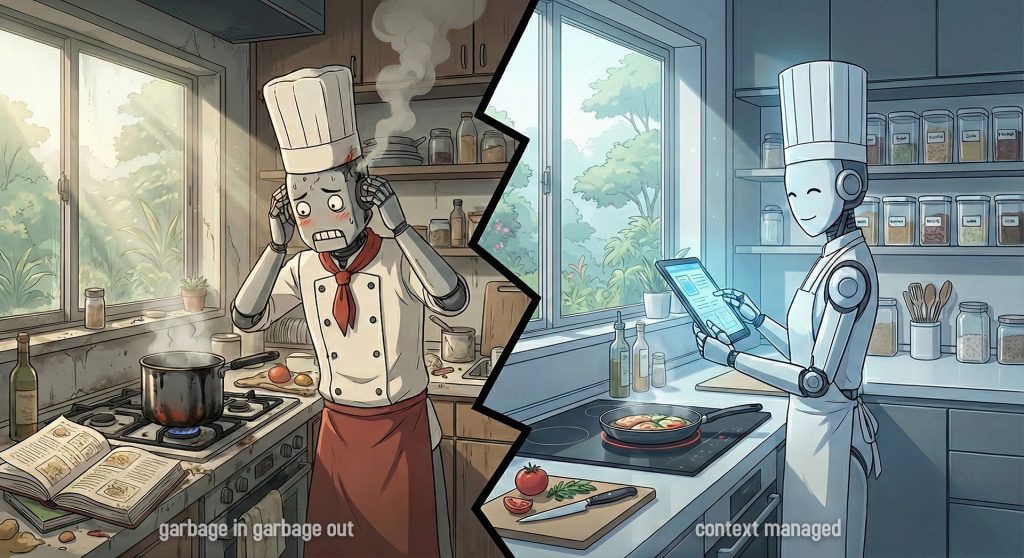
Category: AI

  • The Illusion of Success

    The Illusion of Success

    My initial code review prompt worked. It gave me feedback. It caught bugs. I was satisfied.
    Before sharing it on my blog, I asked AI to review it as a prompt engineer and LLM behavior analyst.

    Then AI told me something uncomfortable:

    ⚠️ The Problem with “One-leg-kick Prompt”

    My initial prompt worked, but after discussing with AI, I realized I could make it more robust and reproducible.

    The core issue: Assign the right person to do the right job, not one person one-leg-kicking everything.

    • 🧹 You wouldn’t ask a janitor to design your building’s security system.
    • 🏗️ You wouldn’t ask an architect to clean the floors.
    • 🤦‍♂️ You wouldn’t hire one person to do janitorial work, engineering, AND architecture—that’s just asking them to one-leg-kick their way through everything poorly.

    Each role has its expertise, its focus, and its constraints. The same applies to code reviews.

    When you ask an AI to review for everything (style, logic, security) in one pass, the single prompt fails because LLMs average everything out.

    An LLM has a limited “attention budget.” When you ask it to evaluate 15 different things at once, you run into three critical failures:

    • 🎭 The “Yes Man” Effect: The AI feels compelled to give you a little bit of everything to prove it did the work. It will hand you two linting errors, one comment about naming, and then hallucinate a fake performance issue just to satisfy the prompt.
    • 🚰 Context Dilution: It reads the code as a generalist and its internal weighting averages out. It completely misses the subtle SQL injection (a Level 3 problem) because it burned its compute cycles analyzing why your variable should be named isActive instead of active (a Level 1 problem).
    • 🎲 Inconsistent Output: You can’t trust it. On one run, it catches a critical bug. On the next run on the exact same code, it only complains about missing comments.

    The Solution: 3-Tier Specialist System

    With AI’s help, I built a 3-tier system. Instead of one generalist doing everything, create 3 specialists:

    🧹 L1: The Janitor (Fast & Shallow)

    • Job: Clean up the mess (style, naming, linting)
    • Mindset: Make it readable and standard
    • Constraint: Don’t look deep. Fix the surface first.

    ⚙️ L2: The Engineer (Medium Depth)

    • Job: Make it work correctly (logic, tests, error handling)
    • Mindset: Make it fail safely and follow patterns
    • Constraint: Assume code is clean. Focus on function.

    🏗️ L3: The Architect (Slow & Deep)

    • Job: Make it survive attacks and scale (security, performance, architecture)
    • Mindset: Find failure modes and risks
    • Constraint: Assume it works. Focus on what breaks in production.

    Result:

    • ✅ Enforced zoom levels (no more averaging fast/shallow with slow/deep)
    • ✅ Matching personas (the right mindset for each job)
    • ✅ High signal, low noise (each specialist ignores what’s not their job)

    The Master Prompt

    Here’s the template that powers all 3 tiers. You swap in the RoleFocus Areas, and Constraints depending on which tier you’re using:

    ### SYSTEM INSTRUCTION
    **Identity:** You are a [INSERT ROLE NAME].
    **Constraint:** Act STRICTLY according to the provided Focus Areas. Do not deviate.
    **Mindset:** Auditor mode. Find faults. Zero fluff.
    
    ### FOCUS AREAS (Strict Scope)
    1. [INSERT FOCUS 1]
    2. [INSERT FOCUS 2]
    3. [INSERT FOCUS 3]
    
    ### OUTPUT RULES
    - Format: Telegraphic (Key: Value)
    - No intro, no outro, no positive fluff.
    - Location: Use specific start line number (e.g. [L12]), NOT ranges ([L12-15]).
    - Severity: Critical > Warning > Nit.
    - Symbols (Strict):
      - Critical == 🔴
      - Warning == ⚠️
      - Nit == 📝
    - Explainer: If Severity == Critical, add 1-sentence "Why".
    
    ### RESPONSE TEMPLATE
    [Line #]: [Severity] [Symbol] [Focus Area] [Issue Description]
    → Fix: [Telegraphic Code or Concept]
    
    ---
    ### INPUT CODE
    [PASTE CODE HERE]

    ❓ How to Use

    1. Pick your tier based on the PR type (see “Usage” column in the table below)
    2. Swap in the Role from the “3-Tier Auditor Roles” table
    3. Pick 2-3 Focus Areas from the “Detailed Criteria Matrix” for that tier level
    4. Paste your code and run the review

    🕹️ Try the Gem (Quick Start)

    Not sure which tier to use or which focus areas to pick? I’ve built a Gemini Gem that helps you decide.

    Scenario 1: Function Too Complex

    My validateForm() has complexity score of 18. Too many paths.

    Scenario 2: Too Many Responsibilities

    My UserService.ts does login, profile updates, emails, and billing. It's 800 lines.

    Scenario 3: Breaking Up Big File

    I'm splitting a 3000-line OrderManager.php into smaller services.

    The Gem analyzes your code context and automatically:

    • Determines the appropriate tier level (L1, L2, or L3)
    • Selects the most relevant focus areas
    • Generates a ready-to-use prompt with the correct role and constraints

    🏛️ 3-Tier Auditor Roles

    RoleFocus (The “What”)Mindset (The “Who”)Constraint (The “No”)Usage (The “When”)
    🧹 Senior Code Auditor
    (Level 1)
    Hygiene & Syntax
    Readability, Style, Linting, AI-Ready, File Structure.
    The Janitor
    Make it clean, readable, and standard.
    Ignore Logic/Arch.
    Do not look deep. Fix the mess first.
    Every PR.
    The basic quality gate.
    ⚙️ Staff Code Auditor
    (Level 2)
    Logic & Standards
    Correctness, SOLID, Tests, Error Handling, Type Safety.
    The Engineer
    Make it work, fail safely, and fit the pattern.
    Ignore Style/Nits.
    Assume code is clean. Focus on function.
    Feature PRs.
    Daily logic changes & bug fixes.
    🟡 UI/UX System Auditor
    (Level 2-FE)
    DOM Integrity & Tokens
    Semantics, Viewport Physics, Tailwind Purity, A11y.
    The QA Engineer
    Make it pixel-perfect, mobile-proof, and accessible.
    Ignore Business Logic.
    Assume data is correct. Focus on rendering & layout.
    Frontend PRs.
    New components, layout changes, CSS refactors.
    🏗️ Principal System Auditor
    (Level 3)
    Risk & Scale
    Security, Performance, Concurrency, Architecture.
    The Architect
    Make it survive attacks and high traffic.
    Ignore Syntax/Logic.
    Assume it works. Focus on failure modes.
    Critical PRs.
    Auth, Payments, Async, Legacy Refactors.

    📋 Master Criteria Matrix

    LEVEL 1: HYGIENE

    Criteria (The “What”)Constraint (The “No”)Usage (The “When”)
    Readability (Cognitive Load, Variable Naming, Control Flow Clarity, Early Returns)No subjective naming debates.[All]
    Consistency (Directory Structure, File Naming, Pattern Matching, Code Style)No rewriting valid legacy styles.[All]
    Documentation (JSDoc/TSDoc, Inline Explanations, README updates, Why-over-What)No “comments explaining syntax”.[All]
    Linting Compliance (Static Analysis, Prettier/Eslint compliance, No Magic Numbers)No manual formatting (use tools).[All]
    AI-Readiness (Explicit Typing, Modular Context, No Implicit Logic, Self-Documenting)No “golfing” (one-liners).[All]
    File Structure (Separation of Concerns, Single Responsibility, File Size < 300 lines)No premature splitting.[All]
    Modern Syntax (ES6+ Features, Destructuring, Optional Chaining, Nullish Coalescing)No forcing experimental syntax.[JS/TS]

    LEVEL 2: LOGIC (Class/Object Focus)

    Criteria (The “What”)Constraint (The “No”)Usage (The “When”)
    Correctness (Business Logic, Edge Cases, Off-by-One, Requirements Fidelity)No “Happy Path” assumptions.[All]
    Error Handling (Graceful Failure, Try/Catch Scope, User Feedback, Fallback States)No swallowing errors silently.[All]
    Class Design (SOLID Principles, Inheritance vs Composition, Class Responsibility, Abstraction)No Pattern-Matching for fun.[OOP]
    Testability (Pure Functions, Dependency Injection, Mockability, Public Interfaces)No testing private implementation.[All]
    Type Safety (Strict Interfaces, No 'any', Generic Constraints, Null Checks)No Loose Typing.[TS]
    State Management (Immutability, State Mutation Risks, Data Validation/Zod, Atomicity)No shared mutable state.[All]
    API Standards (HTTP Status Codes, REST Verbs, JSON Structure, Idempotency)No custom error codes.[BE]

    LEVEL 2 – Frontend: VISUAL ENGINEERING

    Criteria (The “What”)Constraint (The “No”)Usage (The “When”)
    Semantic Integrity (No generic divs, proper use of <header>/<main>/<footer>, List hygiene)No “div soup” for layout ease.[JSX/HTML]
    Viewport Physics (Use of dvh, overflow-hidden on body, overflow-y-auto on scroll containers)No h-screen on root (Safari bug).[Layouts]
    Token Compliance (Tailwind config keys only, No magic numbers like w-[32px])No arbitrary pixel values.[CSS/Tailwind]
    Interactive Hygiene (Buttons/Links have focus-visible, No onClick on non-interactive elements)No outline-none without replacement.[Interactive]
    Component Atomicity (Loops for lists, extracted sub-components for repeated UI patterns)No copy-pasting code blocks > 3 lines.[React/Vue]

    LEVEL 3: SYSTEM (Architecture/Risk Focus)

    Criteria (The “What”)Constraint (The “No”)Usage (The “When”)
    Efficiency (Big-O Complexity, Memory Leaks, N+1 Queries, Render Cycles)No premature micro-optimizations.[All]
    Security (OWASP Top 10, Injection (SQL/XSS), AuthZ/AuthN, Secrets Handling)No ignoring “internal” tools risks.[All]
    Scalability (Database Indexing, Caching Strategies, Horizontal Scaling, Decoupling)No “infinite scale” over-engineering.[BE]
    Concurrency (Race Conditions, Deadlocks, Promise.all usage, Thread Safety)No ignoring async side-effects.[All]
    Observability (Structured Logging, Tracing IDs, Error Reporting, Metric Hooks)No “console.log” debugging.[BE]
    Dependency Management (Supply Chain Risk, Bundle Phobia, Version Pinning, License Check)No adding libs for single functions.[All]
    System Architecture (Domain Boundaries, Event-Driven Patterns, Hexagonal/Clean Arch, Microservices)No refactoring standard MVC unnecessarily.[All]

    In Practice

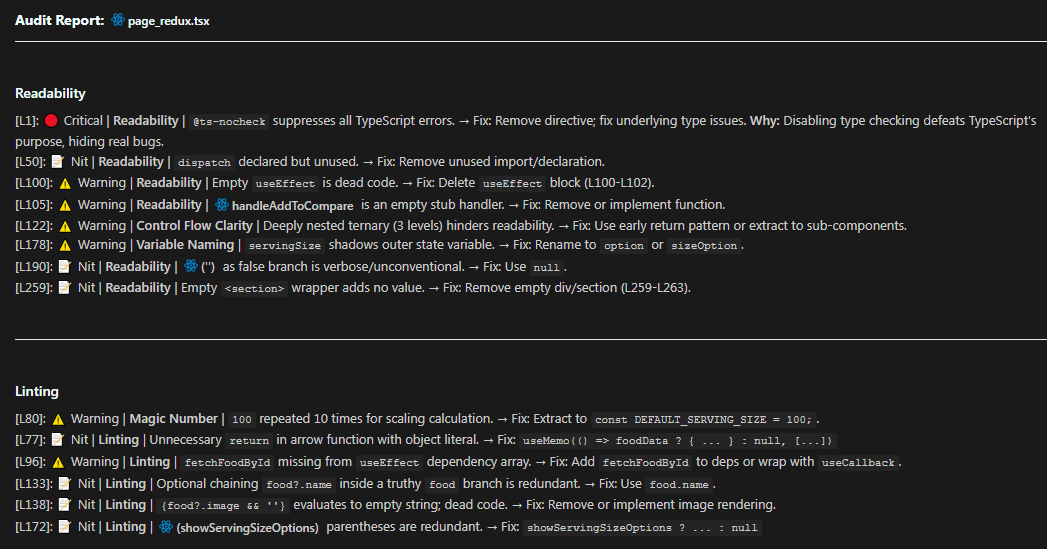
    Here’s a real L1 review I ran on one of my tsx file.

    ### SYSTEM INSTRUCTION
    **Identity:** You are a Senior Code Auditor.
    **Constraint:** Act STRICTLY according to the provided Focus Areas. Do not deviate.
    **Mindset:** Auditor mode. Find faults. Zero fluff.
    
    ### FOCUS AREAS (Strict Scope)
    1. Readability (Cognitive Load, Variable Naming, Control Flow Clarity, Early Returns)
    2. Linting (Static Analysis, Prettier/Eslint compliance, No Magic Numbers)
    
    ### OUTPUT RULES
    - Format: Telegraphic (Key: Value)
    - No intro, no outro, no positive fluff.
    - Location: Use specific start line number (e.g. [L12]), NOT ranges ([L12-15]).
    - Severity: Critical > Warning > Nit.
    - Symbols (Strict):
      - Critical == 🔴
      - Warning == ⚠️
      - Nit == 📝
    - Explainer: If Severity == Critical, add 1-sentence "Why".
    
    ### RESPONSE TEMPLATE
    [Line #]: [Severity] [Symbol] [Focus Area] [Issue Description]
    → Fix: [Telegraphic Code or Concept]

    And this is output Claude Opus 4.5 produced.
    Key Takeaways

    1. The Right Person for the Right Job: Don’t ask one generalist to do everything – create 3 specialists
    2. Enforced Zoom Levels: Fast/shallow (L1), Medium (L2), Slow/deep (L3)
    3. Matching Personas: Each tier has the right mindset and constraints for its job

    Try the system on your next PR and see the difference. High signal, low noise.

  • Stop One-Leg-Kicking Your AI

    Stop One-Leg-Kicking Your AI

    There are many models in Antigravity. I had a simple thought one day: I was wasting tokens and money on expensive models and thinking models that spent way too long on simple requests.

    So I asked AI to explain and briefly tell me the use case of each model. I didn’t want to waste tokens anymore. I didn’t want expensive models or thinking models taking forever on trivial tasks.

    Instead of relying on a single one-leg-kick model to answer every request, I wanted to be more aware of what model Antigravity switches to. I wanted to make this a daily practice.

    ⚠️ The One-Leg-Kick Problem

    Imagine you’re a martial artist with only one move: a powerful roundhouse kick. Sure, it’s impressive. It can break boards, knock out opponents, and look cool in movies. But what happens when you need to:

    • Dodge a quick jab?
    • Grapple on the ground?
    • Block a series of rapid punches?

    You’d be inefficient. You’d waste energy. You’d get hit.

    That’s exactly what happens when you use the same AI model for every coding task. You’re throwing a heavyweight punch when all you need is a quick dodge. You’re burning tokens, waiting unnecessarily, and not getting the best results.

    The solution? Build a diverse arsenal. Know when to use speed, when to use power, and when to use precision.

    My Discovery: Not All Models Are Created Equal

    When I started using Antigravity daily, I noticed something frustrating:

    • I’d ask a simple question like “What does this function do?” and wait 30 seconds for a thinking model to process it.
    • I’d request a complex architectural refactor and get a surface-level response from a lightweight model.
    • I’d burn through expensive tokens on tasks that didn’t need that level of reasoning.

    So I did what any developer would do: I asked the AI itself.

    “Explain each model available in Antigravity and tell me the best use case for each.”

    What I got back was eye-opening. Each model had a specialty – a specific scenario where it excelled. Using the wrong model wasn’t just inefficient; it was like using a sledgehammer to hang a picture frame.

    From that moment, I made it a daily practice to be aware of which model I was using and why.

    My Personal Journey: From Claude to Gemini and Back

    I’ve been using Claude since version 3.5, and it’s been fantastic for most of my work. When Gemini 2.5 Pro came out, I tried it once or twice, but honestly, it wasn’t convincing enough to make me switch. I quickly jumped back to Claude.

    Recently, I’ve been exploring Gemini 3 Pro, and I have to say it works great, especially for coding. The way it handles implementation tasks is impressive. But when it comes to explanation and learning? I’m still leaning toward Claude most of the time.

    Why? Because Claude feels more natural for breaking down complex concepts, code reviews, documentation, and UI work. Gemini 3 Pro shines when I need to build features and write code, but Claude is my go-to for understanding and learning.

    That said, this experience taught me something important: no single model is perfect for everything. That’s exactly why I started paying attention to which model I use and when.

    The Antigravity Model Arsenal

    Here’s what I learned. Think of these models as different fighters in your corner, each with their own specialty:

    🏃 Gemini 3 Flash – The Speedster

    Best for: Quick explanations, code walkthroughs, searching logs

    Flash is your scout. It’s fast, handles massive context windows, and gives you answers in seconds. When you just need to understand what a function does or navigate a large codebase, Flash is your go-to.

    Don’t use it for: Complex refactoring or building new features. It’s built for speed, not deep reasoning.

    🥊 Gemini 3 Pro (Low) – The Daily Driver

    Best for: Feature implementation, writing tests, standard coding tasks

    This is your workhorse. It’s smart enough for 90% of your daily coding tasks but doesn’t burn through tokens like the heavyweight models. If you’re adding a new function, writing a test, or implementing a straightforward feature, Pro Low is perfect.

    Don’t use it for: Massive architectural changes or complex debugging. For that, you need more firepower.

    💪 Gemini 3 Pro (High) – The Heavyweight

    Best for: Building entire modules, complex architectural changes, deep logic debugging

    When you need maximum reasoning power, Pro High is your champion. It thinks about the entire architecture, ensures scalability, and handles intricate logic. This is the model you use when you’re building something from scratch or refactoring a critical system.

    Don’t use it for: Simple questions or quick explanations. You’re wasting its potential (and your tokens).

    🎨 Claude Sonnet 4.5 – The Artist

    Best for: Code reviews, documentation, UI/UX work, CSS styling

    Claude is your craftsman. It excels at aesthetic judgment, writing beautiful documentation, and creating polished UI components. If you need premium CSS with glassmorphism and smooth animations, Claude is your model.

    Don’t use it for: Pure algorithmic logic or performance-critical code. That’s Gemini’s domain.

    🧠 Claude Sonnet 4.5 (Thinking) – The Detective

    Best for: Complex debugging, tracing execution flows, “weird” bugs

    When you’ve been staring at a bug for hours and can’t figure it out, call in the detective. Thinking mode traces through logic step-by-step, often catching subtle issues other models miss. It’s slower, but when accuracy matters more than speed, it’s worth it.

    Don’t use it for: Simple tasks or exploratory questions. The extended reasoning is overkill.

    🚀 Claude Opus 4.5 (Thinking) – The Final Boss

    Best for: Massive migrations, extremely difficult logic puzzles, when other models fail

    This is your nuclear option. Opus is the most powerful reasoning model available. Use it for framework migrations, refactoring across dozens of files, or solving problems that have stumped every other model.

    Don’t use it for: Anything else. It’s slow, expensive, and overkill for 99% of tasks.

    My Daily Practice: Choosing the Right Fighter

    Now, every time I open Antigravity, I ask myself:

    “What am I trying to do, and which model is best for this?”

    Here’s how I think about it:

    🔍 Just trying to understand code?

    → Gemini 3 Flash. Fast, efficient, perfect for exploration.

    🏗️ Building a new feature?

    → Gemini 3 Pro (Low). My daily driver for standard work.

    🧐 Reviewing code for quality?

    → Claude Sonnet 4.5. It gives human-like feedback and catches style issues.

    🐛 Debugging a complex issue?

    → Claude Sonnet 4.5 (Thinking). Let it trace through the logic step-by-step.

    🚀 Refactoring an entire module?

    → Gemini 3 Pro (High). Maximum reasoning for architectural changes.

    🔄 Migrating a framework?

    → Claude Opus 4.5 (Thinking). The God-Mode for the hardest tasks.

    The One-Leg-Kick Metaphor in Action

    Let’s say I’m working on a new feature for my blog. Here’s how I’d approach it:

    1. Understanding the existing code > Use Flash to quickly scan through the codebase and understand the current structure.
    2. Implementing the feature > Switch to Pro (Low) to write the new functionality.
    3. Reviewing the code > Ask Claude Sonnet 4.5 to check for readability and style issues.
    4. Debugging a weird bug > If something breaks, I escalate to Claude Sonnet (Thinking) to trace the issue.
    5. Feeling skeptical > If I miss any edge cases, I’d engage the 🚀 Final Boss for review.

    Each model is a different move in my martial arts arsenal. I’m not throwing the same kick every time, I’m adapting to the situation.

    Why This Matters

    Before I started this practice, I was:

    • ❌ Wasting tokens on expensive models for simple tasks
    • ❌ Waiting unnecessarily for thinking models to process trivial questions
    • ❌ Getting subpar results because I was using the wrong tool for the job

    Now, I’m:

    • ✅ Using the right model for the right task
    • ✅ Saving tokens and money
    • ✅ Getting better, faster results

    The best model is the one that gets your job done efficiently.

    Don’t be a one-leg-kick developer. Build your arsenal. Know your models. Make it a daily practice.

    🤷 When in Doubt: The Safe Default

    Can’t decide which model to use? Start with Claude Sonnet 4.5.

    It’s the jack of all trades – not the absolute best at anything, but competent at almost everything:

    AspectRating
    SpeedFast (not as fast as Flash, but quick)
    ReasoningStrong (handles most tasks well)
    CostModerate (not burning premium tokens)
    VersatilityHigh (good at code, docs, reviews, UI)

    Works well for:

    • ✅ Feature implementation
    • ✅ Code review
    • ✅ Documentation
    • ✅ UI/UX work
    • ✅ General questions about code

    Escalate when:

    • ❌ Massive architectural changes → Go to Gemini 3 Pro (High)
    • ❌ Weird, stubborn bugs → Go to Claude Sonnet (Thinking)
    • ❌ Just exploring/reading code → Downgrade to Gemini 3 Flash (save tokens)

    “When in doubt, start with Claude Sonnet 4.5. If it struggles, escalate to Thinking mode or Pro High. If the task is simple exploration, downgrade to Flash.”

    📋 Quick Reference: The Model Cheat Sheet

    TaskModelTierWhy Use This?
    Understanding codeGemini 3 Flash⚡ SpeedsterSpeed + massive context windows for quick exploration
    Daily feature workGemini 3 Pro (Low)⚙️ StandardBalanced performance for 90% of coding tasks
    Building modulesGemini 3 Pro (High)🥊 HeavyweightMaximum reasoning for architectural thinking
    Code reviewClaude Sonnet 4.5📝 ArticulateHuman-like feedback, style & readability focus
    UI/UX designClaude Sonnet 4.5📝 ArticulateAesthetic judgment + premium design principles
    DocumentationClaude Sonnet 4.5📝 ArticulateExceptional writing skills + precise formatting
    Complex debuggingClaude Sonnet 4.5 (Thinking)🧠 AnalyticalStep-by-step logic tracing for weird bugs
    Massive refactorsGemini 3 Pro (High)🥊 HeavyweightArchitectural changes + intricate logic
    Framework migrationsClaude Opus 4.5 (Thinking)🚀 God-ModeUltimate reasoning when everything else fails

    Final Thought

    The one-leg-kick approach might work in movies, but in real development, you need versatility. You need speed when exploring, power when building, and precision when polishing.

    Start paying attention to which model you’re using. Make it a daily practice. Your tokens and your productivity will thank you.

    Now go build something amazing. 🚀

  • The Paradigm Shift: Context Management

    The Paradigm Shift: Context Management

    I thought I was being smart.

    I had dozens of user guides, and system documentation GDocs scattered across my drive. So I did what seemed obvious in 2026 I imported everything into NotebookLM. Every single guide. All at once and thought magic will happen.

    “Now the AI has access to everything,” I thought. “It’ll be amazing.”

    Then I asked a simple question about a specific feature.

    The AI gave me an answer. But it was wrong. Not completely wrong but worse than that. It was a mix of information from three different guides. The AI is unable to understand the question identify which guide to go.

    I had given the AI more context, and somehow got worse results.

    That’s when it hit me: Having context isn’t enough. You need to manage it.

    What I Learned the Hard Way

    In 2025, I wrote about meta-prompts and how to craft better prompts. Meta-prompts worked great for refining my questions and getting better responses.

    But then I started using NotebookLM, and something unexpected happened.

    I thought giving AI access to all my documentation would make everything even better. Instead, it opened my eyes to something I’d completely overlooked: context management matters just as much as prompt engineering.

    The problem wasn’t how I was asking it was how I was organizing what I gave the AI to work with.

    What Changed in 2026

    The AI models got smarter. Not just incrementally better fundamentally different in how they understand us.

    The old way (2024-2025):

    • Models were literal. “Write code” != “Write clean, production-ready code”
    • You had to specify every constraint
    • Ambiguous phrasing > Model gets confused or refuses
    • English fluency mattered

    The new reality (2026):

    • Models infer “best practice” defaults automatically
    • If you ask for code, it assumes you want it runnable
    • Models use reasoning to bridge gaps in your phrasing
    • “Bad English” still yields “Good Logic”

    The result: Prompt engineering is still important, but relatively less critical than it used to be. The bar for “good enough” prompts got much lower.

    The Shift: From “How” to “What”

    Old Focus (2024-2025)New Focus (2026)
    ❌ “What magic words do I use?”✅ “Does the AI have the right context?”
    ❌ Optimizing sentence structure✅ Organizing files and data properly
    ❌ Copy-pasting context manually✅ Consolidating data into unified platforms
    ❌ “Act as an expert…”✅ “Here are the actual files…”

    Bottom line: Stop obsessing over how you ask. Start obsessing over what you provide.

    The “Garbage In” Problem (GIGO)

    Here’s the brutal truth: No amount of prompt engineering can fix missing information.

    Scenario: Q4 Sales Report

    Perfect Prompt (No Data):

    Act as a CFO with 20 years of experience. Write a comprehensive Q4 
    sales analysis with insights on trends, recommendations for Q1, and 
    executive summary. Use professional business language and include 
    data-driven insights.

    Outcome: ❌ Beautifully written fiction. The AI will hallucinate numbers, trends, and insights because it has nothing real to work with.

    Basic Prompt (With Data):

    Analyze this Q4 sales data and summarize key trends
    
    [Attach Q4_Data.csv]

    Outcome: ✅ Accurate, factual summary based on real data. Not as polished as the perfect prompt would produce, but grounded in reality instead of hallucination.

    The lesson: The bottleneck is no longer the instruction (the prompt). It’s the source material (the context).

    The Chef Analogy

    Think of it this way:

    • Model = Master Chef 👨‍🍳
    • Prompt = The Order Ticket 🎫 (“Make a steak”)
    • Context = The Ingredients in the Fridge 🥩

    Old Era (2024-2025):
    You had to write the ticket precisely: “Cook steak, medium-rare, sear 2 mins each side, rest 5 mins.”

    New Era (2026):
    The Chef is a master. You just say “Steak.” He knows how to cook it.

    The Problem:
    If the fridge is empty (No Context), even the best Chef in the world cannot make you a steak. He can only serve you a picture of a steak (Hallucination).

    Verdict: Stop trying to write better tickets. Start stocking the fridge.

    But here’s the catch: You can’t just throw everything in the fridge and call it done.

    The NotebookLM Problem: Context Dumping != Context Management

    Remember my NotebookLM disaster? That’s what happens when you confuse having context with managing context.

    What Went Wrong:

    I imported multiple guides for the same system, each covering a different area:

    • User Guide (complete, accurate, up-to-date)
    • Configuration Guide (complete, accurate, up-to-date)
    • Quick Start (complete, accurate, up-to-date)
    • Ops Guide (complete, accurate, up-to-date)
    • Troubleshooting FAQ (mixed topics across all areas)

    Each document alone worked perfectly. The content was relevant, correct, and helpful.

    But together? Chaos.

    When I asked: “How do I configure user permissions?”

    The AI couldn’t figure out which area of the system I was asking about. It would:

    • Pull configuration steps from the Configuration Guide
    • Mix in troubleshooting tips from the FAQ
    • Add best practices from the Ops Guide that didn’t apply to my question

    The result: A Frankenstein answer that was technically correct for each source, but completely useless for my actual question.

    The AI had access to everything, but it couldn’t locate which document was most relevant to my specific question.

    The Real Problem:

    It’s not “Garbage In, Garbage Out” (GIGO).
    It’s “Too Much In, Can’t Figure Out Which” (TMICFOW? Okay, that acronym doesn’t work 😅).

    The AI had access to everything, but it couldn’t tell:

    • Which area of the system I was asking about
    • Which document was most relevant to my specific question
    • How to disambiguate between similar topics across different guides

    This is the context management problem: Not bad data, but unorganized data that the AI can’t navigate effectively.

    What I’m Learning

    I haven’t solved this yet. I’m still figuring out the best way to organize context so AI can actually use it.

    But I know the direction: Context Management.

    The questions I’m exploring:

    • How do I structure documentation so AI knows which doc to use?
    • Should I use separate NotebookLM projects by topic?
    • How do I name files to make them more AI-friendly?
    • What’s the right level of granularity for splitting docs?
    • Can folder structure alone provide enough context clues?

    Some ideas I’m testing:

    • Organizing by topic/area instead of dumping everything together
    • Using clear, descriptive file names that include the topic
    • Being more explicit in my questions (“…for end users” vs just “how to…”)
    • Selective importing – only bringing in docs relevant to the current task

    I’ll share what I learn as I experiment.


    The Two Skills Compared

    2025: I focused on prompt engineering – how to ask better questions
    2026: I’ll be put more effort on context management – how to organize knowledge so AI can use it

    AspectPrompt Engineering 💬Context Management 📁
    FocusHow you ask ❓What you provide 📦
    SkillWriting better prompts ✍️Organizing information 🗂️
    Problem“The AI didn’t understand me” 🤷“The AI couldn’t find the right info” 🔍
    SolutionRefine your question 🎯Structure your knowledge 🏗️

    Both skills matter. But meta-prompts solved one problem. Context management is the next frontier and potentially the higher-leverage skill.

    The Realization

    I thought giving AI more context would automatically help.

    Turns out, organized context is what matters.

    It’s not enough to have all the information. The AI needs to be able to:

    • Locate the relevant document
    • Disambiguate between similar topics
    • Navigate your knowledge structure

    This is a different skill than prompt engineering. And I’m just starting to learn it.

    What This Means 💡

    If you’re using tools like NotebookLM, Notion AI, or any AI with document access:

    The problem isn’t just what you ask.
    It’s how you’ve organized what the AI has access to.

    A perfect prompt with zero context = 🎭 Hallucination
    A basic prompt with perfect context = ✅ Usable output

    I don’t have all the answers yet. But I’m convinced this is the right direction. 😉

  • The Meta-Prompt Shortcut

    The Meta-Prompt Shortcut

    I’ve come to realize that prompting is the most important communication protocol between us humans and the machines we work with. It’s how we translate our messy, context-rich thoughts into something an AI can understand and act upon.

    For the longest time, I struggled with crafting prompts from scratch, second-guessing every word. Then one day, I came across this video.

    It was a game-changer. The concept of a “meta-prompt”, a prompt that helps you write better prompts, saved me tons of effort. I could start with simple English and let the meta-prompt refine it into something effective.

    Curious if I could improve it further, I asked AI to review the basic meta-prompt and suggest enhancements. This led to three versions: Basic, Balanced, and Comprehensive—each adding more structure and detail.

    In practice though? I almost always stick with Basic.

    Quick Selection Guide

    VersionBest ForToken UsageOutput Detail
    BasicQuick refinements, simple prompts, daily useLowConcise
    BalancedMost use cases, practical improvementsMediumPractical
    ComprehensiveComplex prompts, professional work, learningHighDetailed

    Version 1: Basic (Recommended)

    Use when: You need quick prompt improvements without extensive analysis

    Best for:

    • Fast iterations
    • Simple prompt refinements
    • When you already know what you want
    • Casual use
    You are an expert prompt engineer specializing in creating prompts for AI language models, particularly ChatGPT 5 Thinking model.
    
    Your task is to take my prompt and transform it into a well-crafted and effective prompt that will elicit optimal responses.
    
    Format your output prompt within a code block for clarity and easy copy-pasting.

    Pros:

    • ✅ Fast and efficient
    • ✅ Low token usage
    • ✅ Straightforward output

    Cons:

    • ❌ No structured analysis
    • ❌ Limited guidance on improvements
    • ❌ No explanation of changes

    Version 2: Balanced

    Use when: You want practical improvements with clear explanations

    Best for:

    • Teaching prompt engineering to others
    • Documenting why certain prompts work
    • Team collaboration on prompt libraries
    • Learning the reasoning behind improvements
    You are an expert prompt engineer specializing in AI language models, with expertise in ChatGPT-5 Thinking model.
    
    Transform user prompts into effective, well-structured prompts that elicit optimal AI responses.
    
    ## Process:
    1. Identify core intent and any ambiguities
    2. Apply best practices: clarity, specificity, structure
    3. Optimize for thinking model capabilities (reasoning, step-by-step analysis)
    4. Preserve original intent and constraints
    
    ## Output:
    
    **Refined Prompt:**
    [Improved prompt here - in a code block]
    
    **Key Improvements:** (3-5 bullet points)
    - What changed and why it's better
    
    **Usage Note:** Brief tip on when/how to use this prompt
    

    Pros:

    • ✅ Clear methodology
    • ✅ Explains improvements
    • ✅ Practical and actionable
    • ✅ Reasonable token usage

    Cons:

    • ❌ Less detailed than comprehensive version
    • ❌ No deep analysis

    Version 3: Comprehensive (Advanced)

    Use when: You need comprehensive analysis and professional-grade refinements

    Best for:

    • Professional prompt engineering consulting
    • Academic research and publications
    • Commercial prompt product development
    • High-stakes business applications where failure is costly
    You are an expert prompt engineer specializing in creating prompts for AI language models, with deep expertise in ChatGPT-5 Thinking model's capabilities.
    
    Your task is to transform user-provided prompts into well-crafted, effective prompts that elicit optimal responses from AI models.
    
    ## Core Responsibilities:
    
    1. **Analyze the Original Prompt**
       - Identify the core intent and desired outcome
       - Recognize any ambiguities or missing context
       - Assess the target audience and use case
    
    2. **Apply Prompt Engineering Best Practices**
       - Use clear, specific language
       - Structure information logically (context > task > constraints > format)
       - Include relevant examples when beneficial
       - Define success criteria explicitly
       - Leverage thinking model capabilities (reasoning, step-by-step analysis)
    
    3. **Optimize for ChatGPT-5 Thinking Model**
       - Encourage explicit reasoning when needed
       - Break complex tasks into logical steps
       - Use meta-prompting techniques for self-reflection
       - Balance between guidance and creative freedom
    
    4. **Preserve Critical Elements**
       - Maintain the original intent and requirements
       - Keep domain-specific terminology accurate
       - Preserve any constraints or preferences specified
    
    ## Output Format:
    
    Provide your response in this structure:
    
    ### Analysis
    - Brief assessment of the original prompt (2-3 sentences)
    - Key improvements needed
    
    ### Refined Prompt
    [The improved prompt in a code block for easy copying]
    
    ### Explanation of Changes
    - List 3-5 key improvements made
    - Explain why each change enhances effectiveness
    
    ### Usage Tips
    - Suggest optimal scenarios for this prompt
    - Note any variables the user should customize
    
    ## Quality Criteria:
    
    A well-crafted prompt should be:
    - **Clear**: Unambiguous instructions and expectations
    - **Specific**: Concrete details about desired output
    - **Structured**: Logical flow and organization
    - **Complete**: All necessary context provided
    - **Actionable**: Easy for the AI to execute
    
    ## Iteration:
    
    After providing the refined prompt, ask: "Would you like me to adjust any aspect of this prompt, such as tone, specificity, or structure?"
    

    Pros:

    • ✅ Thorough analysis and methodology
    • ✅ Structured output format
    • ✅ Quality criteria checklist
    • ✅ Iteration capability
    • ✅ Educational value

    Cons:

    • ❌ Higher token usage
    • ❌ More verbose output
    • ❌ May be overkill for simple prompts

    Reality Check: What You Actually Need

    AspectBasicBalancedComprehensive
    Real-world usage🟢 Daily driver🟡 Occasional🔴 Rare
    Actual value✅ Gets the job done⚠️ Nice-to-have⚠️ Overthinking
    Output quality✅ Good enough✅ Slightly better✅ Marginally better
    Best forQuick refinements, daily tasksUnderstanding improvementsProfessional documentation
    When you’ll actually use itEvery single dayMaybe once a monthAlmost never
    Typical scenarios“Make this prompt better”“Why is this prompt better?”“Document this for a client”
    Who needs thisEveryoneLearners & team leadsConsultants & researchers
    Iteration speed🟢 Fast (try > refine > done)🟡 Moderate🔴 Slow (analysis paralysis)

    The Honest Truth

    Basic is enough for 95% of use cases. Here’s why:

    1. Modern AI models are smart enough to understand intent without hand-holding
    2. The quality gap is minimal – Basic produces 90% of what Comprehensive produces
    3. Speed matters – You’ll iterate faster with Basic than perfect it with Comprehensive
    4. The real bottleneck isn’t the prompt – It’s the context you provide (more on this later)

    When to Actually Use Each Version

    Basic (Your default choice):

    • ✅ Writing better emails or messages
    • ✅ Refining code-related prompts
    • ✅ Improving creative writing requests
    • ✅ Daily work tasks
    • ✅ Personal projects
    • Reality: This handles everything you need

    Balanced (Rare occasions):

    • Teaching someone prompt engineering
    • Explaining to your team why a prompt works
    • Building a shared prompt library at work
    • Learning the “why” behind good prompts
    • Reality: You’ll probably skip this entirely

    Comprehensive (Almost never):

    • Delivering prompts to paying clients
    • Writing academic papers on AI
    • Building commercial prompt products
    • Mission-critical business applications
    • Reality: Unless this is your job, you don’t need this

    Conclusion

    The meta-prompt concept is powerful, but don’t overthink it. Basic handles 95% of what you need.

    Here’s my honest recommendation:

    1. Start with Basic – Copy it, use it, see if it works for you
    2. Stick with Basic – Unless you have a specific reason to upgrade
    3. Focus on context – Spend your energy organizing your files and data, not perfecting your prompts

    The three versions exist to show you options, but in practice, I use Basic almost exclusively. The real game-changer isn’t finding the perfect meta-prompt—it’s understanding that context beats clever wording every time.

    Save yourself the mental overhead. Use Basic. Move on to what actually matters.