Author: Senjitsu

  • It runs, but I don’t own it

    It runs, but I don’t own it

    🧧 It was Chinese New Year Eve.

    While most people were out visiting relatives, sitting around round tables performing the annual ritual of togetherness, I stayed in my cave.

    Not out of sadness. Not out of rebellion. Just preference.

    My energy was low that day. The kind of low where you don’t want to start anything serious but you also don’t want to do nothing. 🎮 So I picked something small, almost trivial: building my own addon for World of Warcraft.

    With the Midnight expansion, Blizzard overhauled large parts of the addon API. A lot of addons broke. The old Macro Manager I used to rely on? Gone. The default UI? Still unbearable. I have never truly played with default UI since day one. This was just another reminder why.

    I searched for alternatives for hours. Found none.

    So I thought: why not make one?

    Not because it matters.
    Not because it advances my career.
    Just because it irritated me enough.

    🎵 Building in the Dark

    I started the way most people would now: raw prompts.

    Zero knowledge of the WoW API. Just describing what I wanted. ❌ It failed. Completely.

    This wasn’t web development. The AI had no training data for WoW’s addon API. It hallucinated functions, repeated patterns, confidently produced things that simply did not work.

    So I grabbed Blizzard’s official UI source code from 📝Gethe‘s GitHub mirror. Blizzard doesn’t host these files publicly, you have to extract them manually from the game client every patch.

    Without Gethe’s automated extraction, the community wouldn’t have an easy way to reference how Blizzard actually builds their UI. Files like Blizzard_MacroUI.lua and Blizzard_MacroUI.xml. I fed them directly into the prompt as reference material.

    And then, something happened.

    ✨ The first workable version was born.
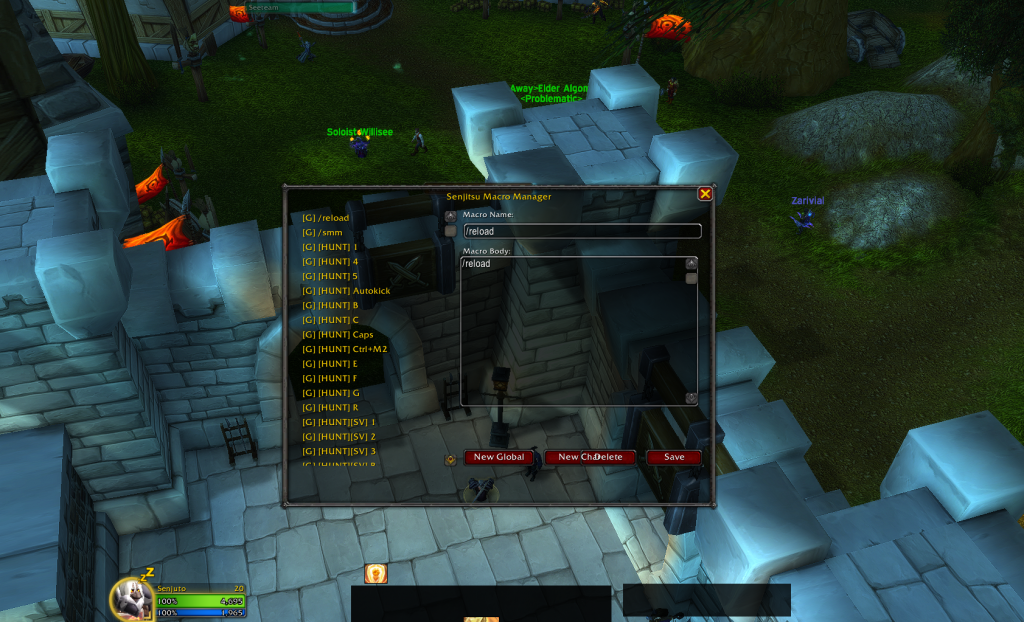
    Main window: macro list on the left, editor on the right

    A main window. A scrollable list on the left showing all my macros, both General (120 slots) and Character-specific. Click one, and the right side populates with its name, icon, and body text. Edit it. Save it. It worked.

    The core CRUD operations were there: Create, Read, Update, Delete. All using WoW’s native API calls GetMacroInfoEditMacroCreateMacro. No XML. Pure Lua. Event-driven through UPDATE_MACROS.

    That moment felt real.

    But the code was a disaster.
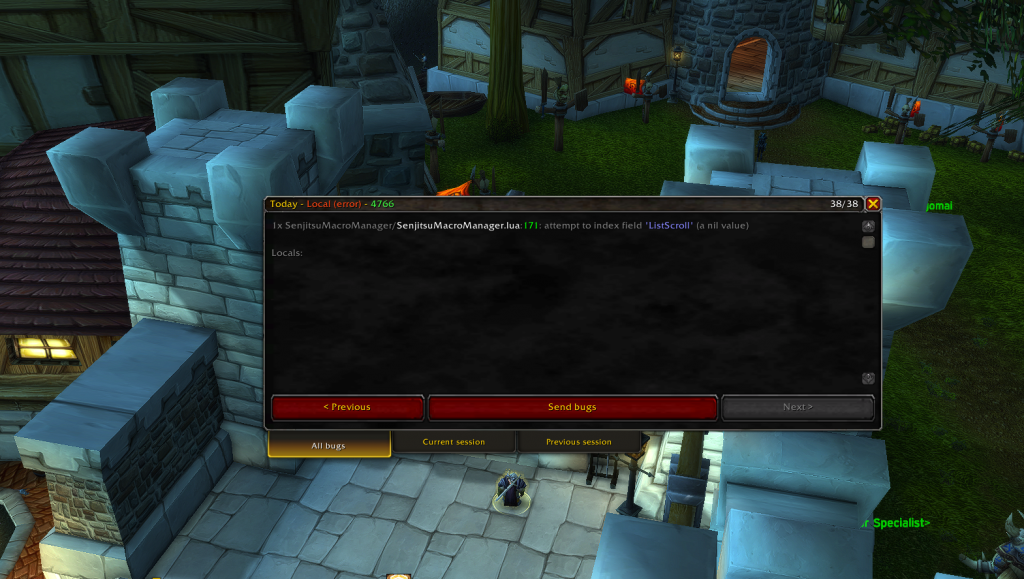
    One massive file. Sequential execution. Functions doing five things at once. The kind of mess you get when you’re stitching together AI outputs without a map.

    It worked. But I didn’t own it.

    🏗️ From Chaos to Structure

    Here’s where the engineer in me kicked in.

    I couldn’t leave it like that. Not because of pride, because I knew this mess would collapse the moment I tried to extend it.

    So I switched modes.

    🗺️ Step 1: Define the lifecycle

    I asked AI to map out the addon’s lifecycle. Not to write code, but to think architecturally. What are the phases? Initialization. Layout calculation. UI creation. Event registration. Refresh logic.

    🦴 Step 2: Create the skeleton

    I created empty functions following Single Responsibility Principle:

    • InitializeLayout(): calculate dimensions
    • CreateListView(): build the macro list
    • CreateDetailView(): build the editor pane
    • RefreshList(): sync UI with game state
    • SetFormMode(): manage create/edit states

    Each function had one job. Clear boundaries.

    🔧 Step 3: Port the mess, piece by piece

    Then I asked AI to migrate the existing code into these functions. Step by step. Test-driven. After each migration, I loaded the addon in-game to verify nothing broke.

    🔍 Step 4: Code review with thinking models

    Finally, I ran my custom code review prompt through Claude Opus 4.6 thinking mode. Powerful enough to catch the vibe-coded mess I couldn’t see.

    It flagged:

    • Poor variable names (check for scroll position, X/Y for columns/rows)
    • Magic numbers scattered everywhere (60, 200, 134400, 120)
    • Dead code (unused variables, no-op self mappings)
    • DRY violations (duplicated limit checks, pool patterns)

    I fixed them. Not blindly, I read each finding, understood the issue, then decided how to address it.

    The result:
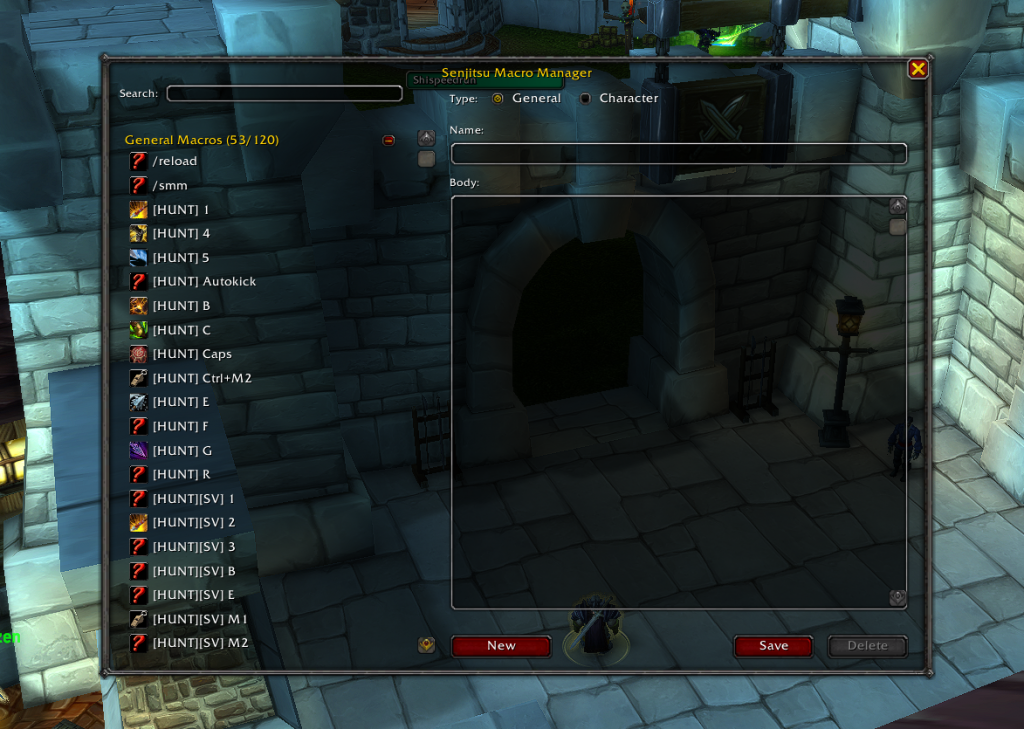
    Real-time search with collapsible General/Character groups

    and finally, a polished and complete version
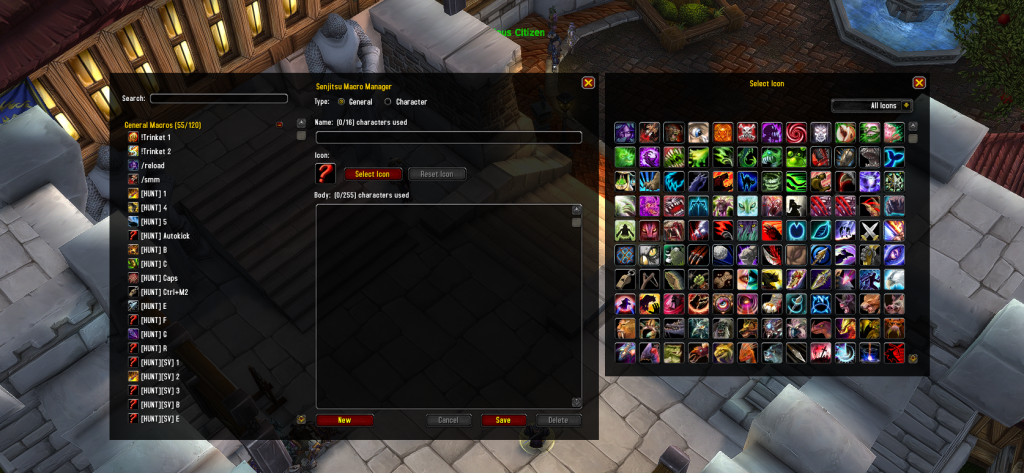
    Icon browser with 120 icons and category filtering

    A clean, modular architecture. Responsive layout system that adapts to screen size. Search/filter with real-time updates. Collapsible groups. Icon browser with 120 icons in a scrollable grid. Type swapping between General and Character macros. Drag support to action bars.

    All of this without understanding frame anchoring, backdrop templates, or WoW’s event system at the start.

    🚪 AI lowered the activation threshold.

    But structure? That still required an architect’s mindset.

    🎮 The Missing Piece: Control

    As a senior engineer, I’m used to being inside the system.

    When something breaks, I don’t guess, I trace.
    I don’t retry randomly, I redefine the problem.
    I don’t ask for miracles, I narrow the search space.

    This time was different.

    Even after the refactor, I still didn’t fully understand the code.

    I couldn’t tell you why BackdropTemplate needed to be explicitly mixed in, or why the Icon Browser had to be anchored TOPRIGHT to move with the main frame. I didn’t mentally simulate the frame lifecycle. If a deep bug appeared (say, taint issues or combat lockdown), I wouldn’t know where to begin. 🤷

    And when AI gets stuck, it spirals. It repeats. It cycles through variations of the same flawed assumption. Normally I would step in and redirect it. But without understanding the API, I couldn’t.

    The relationship shifted.

    I was no longer a collaborator inside the system.
    📋 I was more like a manager reviewing output from a contractor.

    That detachment is new to me.

    The dopamine rush was real. The speed was real. The structure was real. But the grounded feeling, the deep confidence that I could debug anything, was not.

    🚫 A Line I Would Not Cross

    But here’s the important boundary.

    This addon is a toy. A private experiment. A curiosity.

    I would never ship this approach into production.
    I would never sell something I don’t fully understand.
    I would never take responsibility for a system I cannot debug.

    Because

    Production is not about “it works.”
    Production is about: I can carry the consequences. ⚖️

    That line is clear to me.

    There is a difference between experimental creation and accountable engineering.

    🔀 Two Modes of Creation

    What I experienced that day wasn’t an identity crisis. It was exposure to a new mode of creation.

    There is:

    • 🐢 Deep engineering: slow, controlled, fully understood.
    • 🚀 AI-accelerated exploration: fast, partially opaque, low commitment.

    For a side quest on a holiday? The second mode is liberating.

    For real responsibility? It is not enough.

    But here’s what I learned: you can blend them.

    • Use AI to cross the activation threshold
    • Apply engineering discipline to impose structure
    • Use thinking models to audit the mess
    • Test-driven migration to maintain stability

    The result isn’t full mastery. But it’s closer to ownership than raw vibe coding.

    Maybe that’s the adjustment AI demands from engineers: not surrendering control, but knowing when full control is necessary.

    Some creations don’t need to be completely understood to exist.

    But the moment they enter production, they must be.

    🎯 And knowing the difference might be the real skill.

    🛠️ What’s Next

    The addon works. I use it daily. The structure is clean. But I don’t fully own it yet.

    Next steps:

    • Understand frame anchoring: Why does TOPRIGHT positioning make the Icon Browser move with the main frame?
    • Learn backdrop templates: Why does BackdropTemplate need explicit mixin calls?
    • Study the event system: How does UPDATE_MACROS propagate through the UI lifecycle?
    • Master taint mechanics: What triggers combat lockdown and how do secure frames actually work?

    The goal isn’t to abandon AI. It’s to close the gap between “it runs” and “I can carry it.”

    Because that’s when a side project becomes real engineering.

  • 你愿不愿意在『状态最差、最忙的时候』还把时间给这个人?

    你愿不愿意在『状态最差、最忙的时候』还把时间给这个人?

    什么是无效社交,什么是有效社交?

    这个问题在我脑海里反复出现,但我一直没有真正去思考过。
    晚餐时,我随手打开 GPT,顺口问了一下“有效社交是什么”。
    其中一句话直接击中了我:

    “你愿不愿意在『状态最差、最忙的时候』还把时间给这个人?” 💭

    这句话让我意识到:真正重要的关系,是在你最脆弱、最紧张的时候仍然存在的。 ❤️

    我的社交选择 ✂️

    我拒绝大部分社交活动。
    我不需取悦所有人,也不总有精力参与每一次寒暄 😅,年纪大了,体力有限 💤。

    无效社交 VS 有效社交 ⚖️

    我总结出一个简单标准:

    • 无效社交 ❌:消耗时间或精力,却没有回报;只是形式上的应酬。
    • 有效社交 ✅:即使投入有限,也能带来长期价值;信息、机会、信任可复用;让我感到充实或启发。

    很多曾经被动维持的关系,其实属于无效社交。
    它们不会让我成长,只会让我疲惫。
    于是,我学会选择性投入

    筛选关系的小方法 📝

    每当我犹豫是否要继续维持一段关系时,我会问自己:

    如果我现在状态最差、最忙,我还愿意把时间给这个人吗?

    • 如果愿意 ✅ > 关系值得珍惜
    • 如果不愿意 ❌ > 保持礼貌,但降低投入

    这句话帮助我划清边界,也让我坦然面对“被贴标签”的情况。
    真正的人情味,是有限、可控、有选择的。

    我的反思 🔍

    我追求进步,渴望探索更多,所以不断往前走 🚀。
    我是个问题老人,什么都想问,什么都想理解,甚至连无聊的社交,我也会在心里拆解它的意义。

    边界和选择不是冷漠,而是自我管理。 🛡️

    💡 总结

    • 认识无效和有效社交,是自我成长的一部分
    • 保持边界和礼貌,不解释、不辩护
    • 用“状态最差时还愿意投入”的标准筛选关系
    • 真正的人情味,是有限、可控、有选择的 🌱
  • The Illusion of Success

    The Illusion of Success

    My initial code review prompt worked. It gave me feedback. It caught bugs. I was satisfied.
    Before sharing it on my blog, I asked AI to review it as a prompt engineer and LLM behavior analyst.

    Then AI told me something uncomfortable:

    ⚠️ The Problem with “One-leg-kick Prompt”

    My initial prompt worked, but after discussing with AI, I realized I could make it more robust and reproducible.

    The core issue: Assign the right person to do the right job, not one person one-leg-kicking everything.

    • 🧹 You wouldn’t ask a janitor to design your building’s security system.
    • 🏗️ You wouldn’t ask an architect to clean the floors.
    • 🤦‍♂️ You wouldn’t hire one person to do janitorial work, engineering, AND architecture—that’s just asking them to one-leg-kick their way through everything poorly.

    Each role has its expertise, its focus, and its constraints. The same applies to code reviews.

    When you ask an AI to review for everything (style, logic, security) in one pass, the single prompt fails because LLMs average everything out.

    An LLM has a limited “attention budget.” When you ask it to evaluate 15 different things at once, you run into three critical failures:

    • 🎭 The “Yes Man” Effect: The AI feels compelled to give you a little bit of everything to prove it did the work. It will hand you two linting errors, one comment about naming, and then hallucinate a fake performance issue just to satisfy the prompt.
    • 🚰 Context Dilution: It reads the code as a generalist and its internal weighting averages out. It completely misses the subtle SQL injection (a Level 3 problem) because it burned its compute cycles analyzing why your variable should be named isActive instead of active (a Level 1 problem).
    • 🎲 Inconsistent Output: You can’t trust it. On one run, it catches a critical bug. On the next run on the exact same code, it only complains about missing comments.

    The Solution: 3-Tier Specialist System

    With AI’s help, I built a 3-tier system. Instead of one generalist doing everything, create 3 specialists:

    🧹 L1: The Janitor (Fast & Shallow)

    • Job: Clean up the mess (style, naming, linting)
    • Mindset: Make it readable and standard
    • Constraint: Don’t look deep. Fix the surface first.

    ⚙️ L2: The Engineer (Medium Depth)

    • Job: Make it work correctly (logic, tests, error handling)
    • Mindset: Make it fail safely and follow patterns
    • Constraint: Assume code is clean. Focus on function.

    🏗️ L3: The Architect (Slow & Deep)

    • Job: Make it survive attacks and scale (security, performance, architecture)
    • Mindset: Find failure modes and risks
    • Constraint: Assume it works. Focus on what breaks in production.

    Result:

    • ✅ Enforced zoom levels (no more averaging fast/shallow with slow/deep)
    • ✅ Matching personas (the right mindset for each job)
    • ✅ High signal, low noise (each specialist ignores what’s not their job)

    The Master Prompt

    Here’s the template that powers all 3 tiers. You swap in the RoleFocus Areas, and Constraints depending on which tier you’re using:

    ### SYSTEM INSTRUCTION
    **Identity:** You are a [INSERT ROLE NAME].
    **Constraint:** Act STRICTLY according to the provided Focus Areas. Do not deviate.
    **Mindset:** Auditor mode. Find faults. Zero fluff.
    
    ### FOCUS AREAS (Strict Scope)
    1. [INSERT FOCUS 1]
    2. [INSERT FOCUS 2]
    3. [INSERT FOCUS 3]
    
    ### OUTPUT RULES
    - Format: Telegraphic (Key: Value)
    - No intro, no outro, no positive fluff.
    - Location: Use specific start line number (e.g. [L12]), NOT ranges ([L12-15]).
    - Severity: Critical > Warning > Nit.
    - Symbols (Strict):
      - Critical == 🔴
      - Warning == ⚠️
      - Nit == 📝
    - Explainer: If Severity == Critical, add 1-sentence "Why".
    
    ### RESPONSE TEMPLATE
    [Line #]: [Severity] [Symbol] [Focus Area] [Issue Description]
    → Fix: [Telegraphic Code or Concept]
    
    ---
    ### INPUT CODE
    [PASTE CODE HERE]

    ❓ How to Use

    1. Pick your tier based on the PR type (see “Usage” column in the table below)
    2. Swap in the Role from the “3-Tier Auditor Roles” table
    3. Pick 2-3 Focus Areas from the “Detailed Criteria Matrix” for that tier level
    4. Paste your code and run the review

    🕹️ Try the Gem (Quick Start)

    Not sure which tier to use or which focus areas to pick? I’ve built a Gemini Gem that helps you decide.

    Scenario 1: Function Too Complex

    My validateForm() has complexity score of 18. Too many paths.

    Scenario 2: Too Many Responsibilities

    My UserService.ts does login, profile updates, emails, and billing. It's 800 lines.

    Scenario 3: Breaking Up Big File

    I'm splitting a 3000-line OrderManager.php into smaller services.

    The Gem analyzes your code context and automatically:

    • Determines the appropriate tier level (L1, L2, or L3)
    • Selects the most relevant focus areas
    • Generates a ready-to-use prompt with the correct role and constraints

    🏛️ 3-Tier Auditor Roles

    RoleFocus (The “What”)Mindset (The “Who”)Constraint (The “No”)Usage (The “When”)
    🧹 Senior Code Auditor
    (Level 1)
    Hygiene & Syntax
    Readability, Style, Linting, AI-Ready, File Structure.
    The Janitor
    Make it clean, readable, and standard.
    Ignore Logic/Arch.
    Do not look deep. Fix the mess first.
    Every PR.
    The basic quality gate.
    ⚙️ Staff Code Auditor
    (Level 2)
    Logic & Standards
    Correctness, SOLID, Tests, Error Handling, Type Safety.
    The Engineer
    Make it work, fail safely, and fit the pattern.
    Ignore Style/Nits.
    Assume code is clean. Focus on function.
    Feature PRs.
    Daily logic changes & bug fixes.
    🟡 UI/UX System Auditor
    (Level 2-FE)
    DOM Integrity & Tokens
    Semantics, Viewport Physics, Tailwind Purity, A11y.
    The QA Engineer
    Make it pixel-perfect, mobile-proof, and accessible.
    Ignore Business Logic.
    Assume data is correct. Focus on rendering & layout.
    Frontend PRs.
    New components, layout changes, CSS refactors.
    🏗️ Principal System Auditor
    (Level 3)
    Risk & Scale
    Security, Performance, Concurrency, Architecture.
    The Architect
    Make it survive attacks and high traffic.
    Ignore Syntax/Logic.
    Assume it works. Focus on failure modes.
    Critical PRs.
    Auth, Payments, Async, Legacy Refactors.

    📋 Master Criteria Matrix

    LEVEL 1: HYGIENE

    Criteria (The “What”)Constraint (The “No”)Usage (The “When”)
    Readability (Cognitive Load, Variable Naming, Control Flow Clarity, Early Returns)No subjective naming debates.[All]
    Consistency (Directory Structure, File Naming, Pattern Matching, Code Style)No rewriting valid legacy styles.[All]
    Documentation (JSDoc/TSDoc, Inline Explanations, README updates, Why-over-What)No “comments explaining syntax”.[All]
    Linting Compliance (Static Analysis, Prettier/Eslint compliance, No Magic Numbers)No manual formatting (use tools).[All]
    AI-Readiness (Explicit Typing, Modular Context, No Implicit Logic, Self-Documenting)No “golfing” (one-liners).[All]
    File Structure (Separation of Concerns, Single Responsibility, File Size < 300 lines)No premature splitting.[All]
    Modern Syntax (ES6+ Features, Destructuring, Optional Chaining, Nullish Coalescing)No forcing experimental syntax.[JS/TS]

    LEVEL 2: LOGIC (Class/Object Focus)

    Criteria (The “What”)Constraint (The “No”)Usage (The “When”)
    Correctness (Business Logic, Edge Cases, Off-by-One, Requirements Fidelity)No “Happy Path” assumptions.[All]
    Error Handling (Graceful Failure, Try/Catch Scope, User Feedback, Fallback States)No swallowing errors silently.[All]
    Class Design (SOLID Principles, Inheritance vs Composition, Class Responsibility, Abstraction)No Pattern-Matching for fun.[OOP]
    Testability (Pure Functions, Dependency Injection, Mockability, Public Interfaces)No testing private implementation.[All]
    Type Safety (Strict Interfaces, No 'any', Generic Constraints, Null Checks)No Loose Typing.[TS]
    State Management (Immutability, State Mutation Risks, Data Validation/Zod, Atomicity)No shared mutable state.[All]
    API Standards (HTTP Status Codes, REST Verbs, JSON Structure, Idempotency)No custom error codes.[BE]

    LEVEL 2 – Frontend: VISUAL ENGINEERING

    Criteria (The “What”)Constraint (The “No”)Usage (The “When”)
    Semantic Integrity (No generic divs, proper use of <header>/<main>/<footer>, List hygiene)No “div soup” for layout ease.[JSX/HTML]
    Viewport Physics (Use of dvh, overflow-hidden on body, overflow-y-auto on scroll containers)No h-screen on root (Safari bug).[Layouts]
    Token Compliance (Tailwind config keys only, No magic numbers like w-[32px])No arbitrary pixel values.[CSS/Tailwind]
    Interactive Hygiene (Buttons/Links have focus-visible, No onClick on non-interactive elements)No outline-none without replacement.[Interactive]
    Component Atomicity (Loops for lists, extracted sub-components for repeated UI patterns)No copy-pasting code blocks > 3 lines.[React/Vue]

    LEVEL 3: SYSTEM (Architecture/Risk Focus)

    Criteria (The “What”)Constraint (The “No”)Usage (The “When”)
    Efficiency (Big-O Complexity, Memory Leaks, N+1 Queries, Render Cycles)No premature micro-optimizations.[All]
    Security (OWASP Top 10, Injection (SQL/XSS), AuthZ/AuthN, Secrets Handling)No ignoring “internal” tools risks.[All]
    Scalability (Database Indexing, Caching Strategies, Horizontal Scaling, Decoupling)No “infinite scale” over-engineering.[BE]
    Concurrency (Race Conditions, Deadlocks, Promise.all usage, Thread Safety)No ignoring async side-effects.[All]
    Observability (Structured Logging, Tracing IDs, Error Reporting, Metric Hooks)No “console.log” debugging.[BE]
    Dependency Management (Supply Chain Risk, Bundle Phobia, Version Pinning, License Check)No adding libs for single functions.[All]
    System Architecture (Domain Boundaries, Event-Driven Patterns, Hexagonal/Clean Arch, Microservices)No refactoring standard MVC unnecessarily.[All]

    In Practice

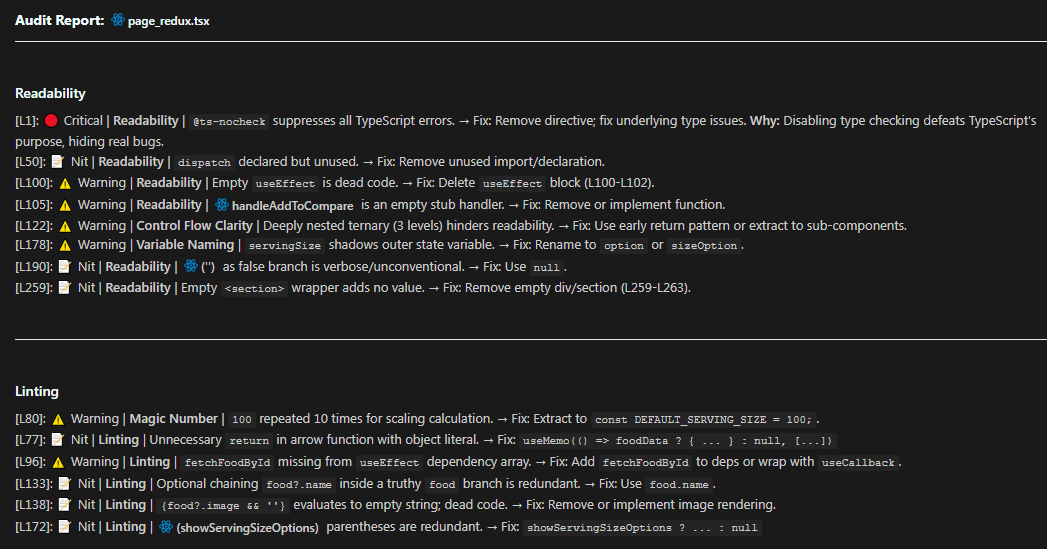
    Here’s a real L1 review I ran on one of my tsx file.

    ### SYSTEM INSTRUCTION
    **Identity:** You are a Senior Code Auditor.
    **Constraint:** Act STRICTLY according to the provided Focus Areas. Do not deviate.
    **Mindset:** Auditor mode. Find faults. Zero fluff.
    
    ### FOCUS AREAS (Strict Scope)
    1. Readability (Cognitive Load, Variable Naming, Control Flow Clarity, Early Returns)
    2. Linting (Static Analysis, Prettier/Eslint compliance, No Magic Numbers)
    
    ### OUTPUT RULES
    - Format: Telegraphic (Key: Value)
    - No intro, no outro, no positive fluff.
    - Location: Use specific start line number (e.g. [L12]), NOT ranges ([L12-15]).
    - Severity: Critical > Warning > Nit.
    - Symbols (Strict):
      - Critical == 🔴
      - Warning == ⚠️
      - Nit == 📝
    - Explainer: If Severity == Critical, add 1-sentence "Why".
    
    ### RESPONSE TEMPLATE
    [Line #]: [Severity] [Symbol] [Focus Area] [Issue Description]
    → Fix: [Telegraphic Code or Concept]

    And this is output Claude Opus 4.5 produced.

    Key Takeaways

    1. The Right Person for the Right Job: Don’t ask one generalist to do everything – create 3 specialists
    2. Enforced Zoom Levels: Fast/shallow (L1), Medium (L2), Slow/deep (L3)
    3. Matching Personas: Each tier has the right mindset and constraints for its job

    Try the system on your next PR and see the difference. High signal, low noise.

  • Stop One-Leg-Kicking Your AI

    Stop One-Leg-Kicking Your AI

    There are many models in Antigravity. I had a simple thought one day: I was wasting tokens and money on expensive models and thinking models that spent way too long on simple requests.

    So I asked AI to explain and briefly tell me the use case of each model. I didn’t want to waste tokens anymore. I didn’t want expensive models or thinking models taking forever on trivial tasks.

    Instead of relying on a single one-leg-kick model to answer every request, I wanted to be more aware of what model Antigravity switches to. I wanted to make this a daily practice.

    ⚠️ The One-Leg-Kick Problem

    Imagine you’re a martial artist with only one move: a powerful roundhouse kick. Sure, it’s impressive. It can break boards, knock out opponents, and look cool in movies. But what happens when you need to:

    • Dodge a quick jab?
    • Grapple on the ground?
    • Block a series of rapid punches?

    You’d be inefficient. You’d waste energy. You’d get hit.

    That’s exactly what happens when you use the same AI model for every coding task. You’re throwing a heavyweight punch when all you need is a quick dodge. You’re burning tokens, waiting unnecessarily, and not getting the best results.

    The solution? Build a diverse arsenal. Know when to use speed, when to use power, and when to use precision.

    My Discovery: Not All Models Are Created Equal

    When I started using Antigravity daily, I noticed something frustrating:

    • I’d ask a simple question like “What does this function do?” and wait 30 seconds for a thinking model to process it.
    • I’d request a complex architectural refactor and get a surface-level response from a lightweight model.
    • I’d burn through expensive tokens on tasks that didn’t need that level of reasoning.

    So I did what any developer would do: I asked the AI itself.

    “Explain each model available in Antigravity and tell me the best use case for each.”

    What I got back was eye-opening. Each model had a specialty – a specific scenario where it excelled. Using the wrong model wasn’t just inefficient; it was like using a sledgehammer to hang a picture frame.

    From that moment, I made it a daily practice to be aware of which model I was using and why.

    My Personal Journey: From Claude to Gemini and Back

    I’ve been using Claude since version 3.5, and it’s been fantastic for most of my work. When Gemini 2.5 Pro came out, I tried it once or twice, but honestly, it wasn’t convincing enough to make me switch. I quickly jumped back to Claude.

    Recently, I’ve been exploring Gemini 3 Pro, and I have to say it works great, especially for coding. The way it handles implementation tasks is impressive. But when it comes to explanation and learning? I’m still leaning toward Claude most of the time.

    Why? Because Claude feels more natural for breaking down complex concepts, code reviews, documentation, and UI work. Gemini 3 Pro shines when I need to build features and write code, but Claude is my go-to for understanding and learning.

    That said, this experience taught me something important: no single model is perfect for everything. That’s exactly why I started paying attention to which model I use and when.

    The Antigravity Model Arsenal

    Here’s what I learned. Think of these models as different fighters in your corner, each with their own specialty:

    🏃 Gemini 3 Flash – The Speedster

    Best for: Quick explanations, code walkthroughs, searching logs

    Flash is your scout. It’s fast, handles massive context windows, and gives you answers in seconds. When you just need to understand what a function does or navigate a large codebase, Flash is your go-to.

    Don’t use it for: Complex refactoring or building new features. It’s built for speed, not deep reasoning.

    🥊 Gemini 3 Pro (Low) – The Daily Driver

    Best for: Feature implementation, writing tests, standard coding tasks

    This is your workhorse. It’s smart enough for 90% of your daily coding tasks but doesn’t burn through tokens like the heavyweight models. If you’re adding a new function, writing a test, or implementing a straightforward feature, Pro Low is perfect.

    Don’t use it for: Massive architectural changes or complex debugging. For that, you need more firepower.

    💪 Gemini 3 Pro (High) – The Heavyweight

    Best for: Building entire modules, complex architectural changes, deep logic debugging

    When you need maximum reasoning power, Pro High is your champion. It thinks about the entire architecture, ensures scalability, and handles intricate logic. This is the model you use when you’re building something from scratch or refactoring a critical system.

    Don’t use it for: Simple questions or quick explanations. You’re wasting its potential (and your tokens).

    🎨 Claude Sonnet 4.5 – The Artist

    Best for: Code reviews, documentation, UI/UX work, CSS styling

    Claude is your craftsman. It excels at aesthetic judgment, writing beautiful documentation, and creating polished UI components. If you need premium CSS with glassmorphism and smooth animations, Claude is your model.

    Don’t use it for: Pure algorithmic logic or performance-critical code. That’s Gemini’s domain.

    🧠 Claude Sonnet 4.5 (Thinking) – The Detective

    Best for: Complex debugging, tracing execution flows, “weird” bugs

    When you’ve been staring at a bug for hours and can’t figure it out, call in the detective. Thinking mode traces through logic step-by-step, often catching subtle issues other models miss. It’s slower, but when accuracy matters more than speed, it’s worth it.

    Don’t use it for: Simple tasks or exploratory questions. The extended reasoning is overkill.

    🚀 Claude Opus 4.5 (Thinking) – The Final Boss

    Best for: Massive migrations, extremely difficult logic puzzles, when other models fail

    This is your nuclear option. Opus is the most powerful reasoning model available. Use it for framework migrations, refactoring across dozens of files, or solving problems that have stumped every other model.

    Don’t use it for: Anything else. It’s slow, expensive, and overkill for 99% of tasks.

    My Daily Practice: Choosing the Right Fighter

    Now, every time I open Antigravity, I ask myself:

    “What am I trying to do, and which model is best for this?”

    Here’s how I think about it:

    🔍 Just trying to understand code?

    → Gemini 3 Flash. Fast, efficient, perfect for exploration.

    🏗️ Building a new feature?

    → Gemini 3 Pro (Low). My daily driver for standard work.

    🧐 Reviewing code for quality?

    → Claude Sonnet 4.5. It gives human-like feedback and catches style issues.

    🐛 Debugging a complex issue?

    → Claude Sonnet 4.5 (Thinking). Let it trace through the logic step-by-step.

    🚀 Refactoring an entire module?

    → Gemini 3 Pro (High). Maximum reasoning for architectural changes.

    🔄 Migrating a framework?

    → Claude Opus 4.5 (Thinking). The God-Mode for the hardest tasks.

    The One-Leg-Kick Metaphor in Action

    Let’s say I’m working on a new feature for my blog. Here’s how I’d approach it:

    1. Understanding the existing code > Use Flash to quickly scan through the codebase and understand the current structure.
    2. Implementing the feature > Switch to Pro (Low) to write the new functionality.
    3. Reviewing the code > Ask Claude Sonnet 4.5 to check for readability and style issues.
    4. Debugging a weird bug > If something breaks, I escalate to Claude Sonnet (Thinking) to trace the issue.
    5. Feeling skeptical > If I miss any edge cases, I’d engage the 🚀 Final Boss for review.

    Each model is a different move in my martial arts arsenal. I’m not throwing the same kick every time, I’m adapting to the situation.

    Why This Matters

    Before I started this practice, I was:

    • ❌ Wasting tokens on expensive models for simple tasks
    • ❌ Waiting unnecessarily for thinking models to process trivial questions
    • ❌ Getting subpar results because I was using the wrong tool for the job

    Now, I’m:

    • ✅ Using the right model for the right task
    • ✅ Saving tokens and money
    • ✅ Getting better, faster results

    The best model is the one that gets your job done efficiently.

    Don’t be a one-leg-kick developer. Build your arsenal. Know your models. Make it a daily practice.

    🤷 When in Doubt: The Safe Default

    Can’t decide which model to use? Start with Claude Sonnet 4.5.

    It’s the jack of all trades – not the absolute best at anything, but competent at almost everything:

    AspectRating
    SpeedFast (not as fast as Flash, but quick)
    ReasoningStrong (handles most tasks well)
    CostModerate (not burning premium tokens)
    VersatilityHigh (good at code, docs, reviews, UI)

    Works well for:

    • ✅ Feature implementation
    • ✅ Code review
    • ✅ Documentation
    • ✅ UI/UX work
    • ✅ General questions about code

    Escalate when:

    • ❌ Massive architectural changes → Go to Gemini 3 Pro (High)
    • ❌ Weird, stubborn bugs → Go to Claude Sonnet (Thinking)
    • ❌ Just exploring/reading code → Downgrade to Gemini 3 Flash (save tokens)

    “When in doubt, start with Claude Sonnet 4.5. If it struggles, escalate to Thinking mode or Pro High. If the task is simple exploration, downgrade to Flash.”

    📋 Quick Reference: The Model Cheat Sheet

    TaskModelTierWhy Use This?
    Understanding codeGemini 3 Flash⚡ SpeedsterSpeed + massive context windows for quick exploration
    Daily feature workGemini 3 Pro (Low)⚙️ StandardBalanced performance for 90% of coding tasks
    Building modulesGemini 3 Pro (High)🥊 HeavyweightMaximum reasoning for architectural thinking
    Code reviewClaude Sonnet 4.5📝 ArticulateHuman-like feedback, style & readability focus
    UI/UX designClaude Sonnet 4.5📝 ArticulateAesthetic judgment + premium design principles
    DocumentationClaude Sonnet 4.5📝 ArticulateExceptional writing skills + precise formatting
    Complex debuggingClaude Sonnet 4.5 (Thinking)🧠 AnalyticalStep-by-step logic tracing for weird bugs
    Massive refactorsGemini 3 Pro (High)🥊 HeavyweightArchitectural changes + intricate logic
    Framework migrationsClaude Opus 4.5 (Thinking)🚀 God-ModeUltimate reasoning when everything else fails

    Final Thought

    The one-leg-kick approach might work in movies, but in real development, you need versatility. You need speed when exploring, power when building, and precision when polishing.

    Start paying attention to which model you’re using. Make it a daily practice. Your tokens and your productivity will thank you.

    Now go build something amazing. 🚀

  • The Try Pattern

    The Try Pattern

    What I Learned About Return Types During a Code Review

    Today I was doing a code review on a state management class I’d been working on. Everything looked fine at first, clean separation of concerns, good type safety, proper encapsulation. But then I noticed something odd about one of my methods:

    public handleUserAction(action: UserAction) {
      if (this.lifecycleState !== 'Active') return;
      
      const nextState = this.transition(this.currentState, action);
      if (!nextState) return;
      
      this.currentState = nextState;
      this.notify();
    }

    No return type specified. Just… void by default.

    I paused. Should this return something? I wasn’t sure, so I asked my AI Assistant. What I learned completely changed how I think about API design.

    The Problem with void Returns

    Consider this common scenario:

    public handleUserAction(action: UserAction): void {
      if (this.lifecycleState !== 'Active') return;
      
      const nextState = this.transition(this.currentState, action);
      if (!nextState) return;
      
      this.currentState = nextState;
      this.notify();
    }

    What’s wrong here?

    1. Silent Failures: The caller has no idea if the action succeeded or was ignored.
    2. Implicit undefined: Early returns give you undefined, which is a “falsy” value but not semantically meaningful.
    3. No Feedback Loop: You can’t conditionally trigger side effects based on whether the action actually happened.

    The Solution: The Try Pattern

    The Try Pattern is simple: your method “tries” to perform an action and returns true if it succeeded, false if it didn’t.

    public handleUserAction(action: UserAction): boolean {
      if (this.lifecycleState !== 'Active') return false;
      
      const nextState = this.transition(this.currentState, action);
      if (!nextState) return false;
      
      this.currentState = nextState;
      this.notify();
      return true;
    }

    Why This Matters: Three Key Benefits

    1. The Try Pattern: Clear Intent

    The function name and return type together communicate intent:

    “I will try to handle this user action. If I succeed, you’ll get true. If the conditions aren’t right or the transition is invalid, you’ll get false.”

    This is self-documenting code. A developer reading your API immediately understands that this method might not always succeed.

    2. Caller Flexibility

    Returning a boolean gives the caller options without forcing them to use it.

    Scenario A: Simple Usage (Ignore the Result)

    stateManager.handleUserAction('EXPAND');
    // Works fine. Return value is ignored.</em>
    

    Scenario B: Advanced Usage (React to Success/Failure)

    const success = stateManager.handleUserAction('EXPAND');
    
    if (!success) {
      // Play error sound</em>
      playErrorBuzz();
      
      // Show a tooltip</em>
      showTooltip('Action cannot be performed at this time');
      
      // Log analytics</em>
      analytics.track('action_failed', { action: 'submit' });
    }

    The beauty here is that you’re not forcing complexity on simple use cases, but you’re enabling advanced use cases when needed.

    3. Avoiding undefined Pitfalls

    When you don’t specify a return type and use early returns, TypeScript infers the return type as void | undefined. This can lead to subtle bugs:

    // ❌ Without explicit boolean return
    public handleUserAction(action: UserAction) {
      if (this.state !== 'Active') return; // Returns undefined
      // ... do stuff
    }
    
    // Later in code:
    if (handleUserAction('EXPAND')) {
      // This block will NEVER run, even on success!
      // Because the function returns undefined, which is falsy.
    }
    

    With an explicit boolean return type:

    // ✅ With explicit boolean return</em>
    public handleUserAction(action: UserAction): boolean {
      if (this.state !== 'Active') return false; // Explicit false</em>
      // ... do stuff</em>
      return true; // Explicit success</em>
    }
    
    // Later in code:</em>
    if (handleUserAction('EXPAND')) {
      // This works as expected!</em>
      showSuccessMessage();
    }

    When NOT to Use This Pattern

    This pattern is best for commands or actions that might fail. It’s not appropriate for:

    1. Getters: Methods that just retrieve data (getState()isActive())
    2. Pure Calculations: Functions that always succeed (calculateTotal()formatDate())
    3. Async Operations: Use Promise<boolean> or Result<T, E> types instead

    Summary: The Professional Standard

    Always return a boolean for methods that:

    • Perform state changes
    • Execute user actions
    • Might fail due to preconditions

    Benefits:

    • Self-documenting intent (the “Try Pattern”)
    • Caller flexibility (simple or advanced usage)
    • Avoids undefined pitfalls
    • Consistent, predictable API

    ☑️ Real-world impact:

    • Easier debugging (you can log failures)
    • Better UX (you can show error messages)
    • Cleaner analytics (you can track invalid actions)

    Bottom line: If you’re writing a method that might not always succeed, return a boolean. Your future self (and your teammates) will thank you.

  • The Paradigm Shift: Context Management

    The Paradigm Shift: Context Management

    I thought I was being smart.

    I had dozens of user guides, and system documentation GDocs scattered across my drive. So I did what seemed obvious in 2026 I imported everything into NotebookLM. Every single guide. All at once and thought magic will happen.

    “Now the AI has access to everything,” I thought. “It’ll be amazing.”

    Then I asked a simple question about a specific feature.

    The AI gave me an answer. But it was wrong. Not completely wrong but worse than that. It was a mix of information from three different guides. The AI is unable to understand the question identify which guide to go.

    I had given the AI more context, and somehow got worse results.

    That’s when it hit me: Having context isn’t enough. You need to manage it.

    What I Learned the Hard Way

    In 2025, I wrote about meta-prompts and how to craft better prompts. Meta-prompts worked great for refining my questions and getting better responses.

    But then I started using NotebookLM, and something unexpected happened.

    I thought giving AI access to all my documentation would make everything even better. Instead, it opened my eyes to something I’d completely overlooked: context management matters just as much as prompt engineering.

    The problem wasn’t how I was asking it was how I was organizing what I gave the AI to work with.

    What Changed in 2026

    The AI models got smarter. Not just incrementally better fundamentally different in how they understand us.

    The old way (2024-2025):

    • Models were literal. “Write code” != “Write clean, production-ready code”
    • You had to specify every constraint
    • Ambiguous phrasing > Model gets confused or refuses
    • English fluency mattered

    The new reality (2026):

    • Models infer “best practice” defaults automatically
    • If you ask for code, it assumes you want it runnable
    • Models use reasoning to bridge gaps in your phrasing
    • “Bad English” still yields “Good Logic”

    The result: Prompt engineering is still important, but relatively less critical than it used to be. The bar for “good enough” prompts got much lower.

    The Shift: From “How” to “What”

    Old Focus (2024-2025)New Focus (2026)
    ❌ “What magic words do I use?”✅ “Does the AI have the right context?”
    ❌ Optimizing sentence structure✅ Organizing files and data properly
    ❌ Copy-pasting context manually✅ Consolidating data into unified platforms
    ❌ “Act as an expert…”✅ “Here are the actual files…”

    Bottom line: Stop obsessing over how you ask. Start obsessing over what you provide.

    The “Garbage In” Problem (GIGO)

    Here’s the brutal truth: No amount of prompt engineering can fix missing information.

    Scenario: Q4 Sales Report

    Perfect Prompt (No Data):

    Act as a CFO with 20 years of experience. Write a comprehensive Q4 
    sales analysis with insights on trends, recommendations for Q1, and 
    executive summary. Use professional business language and include 
    data-driven insights.

    Outcome: ❌ Beautifully written fiction. The AI will hallucinate numbers, trends, and insights because it has nothing real to work with.

    Basic Prompt (With Data):

    Analyze this Q4 sales data and summarize key trends
    
    [Attach Q4_Data.csv]

    Outcome: ✅ Accurate, factual summary based on real data. Not as polished as the perfect prompt would produce, but grounded in reality instead of hallucination.

    The lesson: The bottleneck is no longer the instruction (the prompt). It’s the source material (the context).

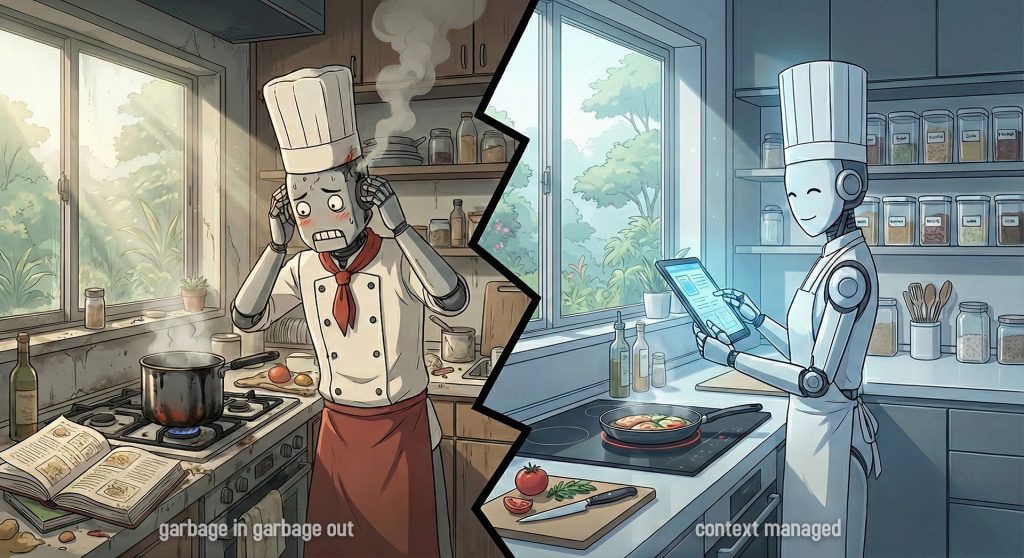
    The Chef Analogy

    Think of it this way:

    • Model = Master Chef 👨‍🍳
    • Prompt = The Order Ticket 🎫 (“Make a steak”)
    • Context = The Ingredients in the Fridge 🥩

    Old Era (2024-2025):
    You had to write the ticket precisely: “Cook steak, medium-rare, sear 2 mins each side, rest 5 mins.”

    New Era (2026):
    The Chef is a master. You just say “Steak.” He knows how to cook it.

    The Problem:
    If the fridge is empty (No Context), even the best Chef in the world cannot make you a steak. He can only serve you a picture of a steak (Hallucination).

    Verdict: Stop trying to write better tickets. Start stocking the fridge.

    But here’s the catch: You can’t just throw everything in the fridge and call it done.

    The NotebookLM Problem: Context Dumping != Context Management

    Remember my NotebookLM disaster? That’s what happens when you confuse having context with managing context.

    What Went Wrong:

    I imported multiple guides for the same system, each covering a different area:

    • User Guide (complete, accurate, up-to-date)
    • Configuration Guide (complete, accurate, up-to-date)
    • Quick Start (complete, accurate, up-to-date)
    • Ops Guide (complete, accurate, up-to-date)
    • Troubleshooting FAQ (mixed topics across all areas)

    Each document alone worked perfectly. The content was relevant, correct, and helpful.

    But together? Chaos.

    When I asked: “How do I configure user permissions?”

    The AI couldn’t figure out which area of the system I was asking about. It would:

    • Pull configuration steps from the Configuration Guide
    • Mix in troubleshooting tips from the FAQ
    • Add best practices from the Ops Guide that didn’t apply to my question

    The result: A Frankenstein answer that was technically correct for each source, but completely useless for my actual question.

    The AI had access to everything, but it couldn’t locate which document was most relevant to my specific question.

    The Real Problem:

    It’s not “Garbage In, Garbage Out” (GIGO).
    It’s “Too Much In, Can’t Figure Out Which” (TMICFOW? Okay, that acronym doesn’t work 😅).

    The AI had access to everything, but it couldn’t tell:

    • Which area of the system I was asking about
    • Which document was most relevant to my specific question
    • How to disambiguate between similar topics across different guides

    This is the context management problem: Not bad data, but unorganized data that the AI can’t navigate effectively.

    What I’m Learning

    I haven’t solved this yet. I’m still figuring out the best way to organize context so AI can actually use it.

    But I know the direction: Context Management.

    The questions I’m exploring:

    • How do I structure documentation so AI knows which doc to use?
    • Should I use separate NotebookLM projects by topic?
    • How do I name files to make them more AI-friendly?
    • What’s the right level of granularity for splitting docs?
    • Can folder structure alone provide enough context clues?

    Some ideas I’m testing:

    • Organizing by topic/area instead of dumping everything together
    • Using clear, descriptive file names that include the topic
    • Being more explicit in my questions (“…for end users” vs just “how to…”)
    • Selective importing – only bringing in docs relevant to the current task

    I’ll share what I learn as I experiment.


    The Two Skills Compared

    2025: I focused on prompt engineering – how to ask better questions
    2026: I’ll be put more effort on context management – how to organize knowledge so AI can use it

    AspectPrompt Engineering 💬Context Management 📁
    FocusHow you ask ❓What you provide 📦
    SkillWriting better prompts ✍️Organizing information 🗂️
    Problem“The AI didn’t understand me” 🤷“The AI couldn’t find the right info” 🔍
    SolutionRefine your question 🎯Structure your knowledge 🏗️

    Both skills matter. But meta-prompts solved one problem. Context management is the next frontier and potentially the higher-leverage skill.

    The Realization

    I thought giving AI more context would automatically help.

    Turns out, organized context is what matters.

    It’s not enough to have all the information. The AI needs to be able to:

    • Locate the relevant document
    • Disambiguate between similar topics
    • Navigate your knowledge structure

    This is a different skill than prompt engineering. And I’m just starting to learn it.

    What This Means 💡

    If you’re using tools like NotebookLM, Notion AI, or any AI with document access:

    The problem isn’t just what you ask.
    It’s how you’ve organized what the AI has access to.

    A perfect prompt with zero context = 🎭 Hallucination
    A basic prompt with perfect context = ✅ Usable output

    I don’t have all the answers yet. But I’m convinced this is the right direction. 😉

  • Guard Clauses: Sharpen Your Logic

    Guard Clauses: Sharpen Your Logic

    The Pain: When Code Becomes a Maze

    I still remember debugging a Hero Image and caption detection function at 12AM. Several levels of nesting. I sat there, coffee cold, counting indentation levels like some deranged accountant, muttering “which branch am I even in?”

    You’ve been there too, haven’t you? You open a function, and your eyes start scanning. One if statement. Then another nested inside. Then another. The actual business logic? Buried somewhere past line 30, five indentation levels deep, like treasure at the bottom of a badly designed dungeon.

    You need to debug a null reference error. Simple enough, right? Wrong. First, you have to mentally trace through a pyramid of conditions just to understand when the code even reaches the problematic line. Ten seconds pass. You’re still mapping the control flow in your head. Your cursor is hovering somewhere in the middle, and you’ve lost track of which else belongs to which if.

    This is the reality of deeply nested conditionals. The “happy path” the main logic your function exists to perform becomes obscured by layers of defensive checks. During code reviews, you find yourself scrolling, counting braces, trying to remember which condition you’re currently inside.

    The cognitive overhead is real. And it compounds with every new edge case you need to handle.

    I wish someone had shown me guard clauses five years earlier.

    What Is a Guard Clause?

    guard clause is an early exit that prevents invalid states from flowing deeper into a function.

    It’s a conditional statement placed at the beginning of a function that checks for exceptional, invalid, or edge-case conditions. When such a condition is detected, the guard clause immediately exits the function typically via return, throw, or continue.

    Key Characteristics

    • Positioned at the top of the function
    • Handles invalid, exceptional, or edge cases (not the main logic)
    • Exits early using return, throw, or continue
    • Inverts the condition compared to traditional nested if statements

    Guard clauses are not about adding more conditions. They’re about reorganizing existing conditions to make the code’s intent clearer.

    Before vs After: Visual Proof

    The difference between nested conditionals and guard clauses is best understood visually.

    ❌ Without Guard Clauses

    function processOrder(order) {
      if (order !== null) {
        if (order.items.length > 0) {
          if (order.customer !== null) {
            if (order.customer.isVerified) {
              // Finally, the actual business logic
              const total = calculateTotal(order.items);
              const discount = applyDiscount(order.customer);
              const finalAmount = total - discount;
              
              return createInvoice(order, finalAmount);
            } else {
              throw new Error('Customer not verified');
            }
          } else {
            throw new Error('Customer is required');
          }
        } else {
          throw new Error('Order must contain items');
        }
      } else {
        throw new Error('Order cannot be null');
      }
    }

    Problems:

    • Business logic is buried at indentation level 5
    • Error messages are in reverse order (most specific first)
    • Hard to scan you must read the entire function to find the happy path
    • Adding a new validation requires navigating the nesting structure

    ✅ With Guard Clauses

    function processOrder(order) {
      // Guard clauses: handle invalid states first
      if (order === null) {
        throw new Error('Order cannot be null');
      }
      
      if (order.items.length === 0) {
        throw new Error('Order must contain items');
      }
      
      if (order.customer === null) {
        throw new Error('Customer is required');
      }
      
      if (!order.customer.isVerified) {
        throw new Error('Customer not verified');
      }
      
      // Happy path: the actual business logic
      const total = calculateTotal(order.items);
      const discount = applyDiscount(order.customer);
      const finalAmount = total - discount;
      
      return createInvoice(order, finalAmount);
    }

    Benefits:

    • Zero indentation for the main logic
    • Validations read in logical order (general to specific)
    • Happy path is immediately visible
    • Adding new validations is trivial just insert another guard clause

    The visual contrast is undeniable. The second version reads like a checklist: verify preconditions, then execute the core logic.

    Why Guard Clauses Improve Code

    Guard clauses aren’t just a stylistic preference. They provide measurable improvements to code quality.

    🔍 Readability: Top-to-Bottom Scanning

    Human eyes scan code from top to bottom. Guard clauses align with this natural reading pattern. You see the preconditions first, then the main logic. No mental stack required to track which branch you’re in.

    🧠 Cognitive Load: Fewer Branches to Track

    Nested conditionals force you to maintain a mental model of “where you are” in the branching tree. Guard clauses eliminate this. Each check is independent. If you pass all guards, you’re in the happy path. Simple.

    🧪 Debugging: Fail Fast, Fail Clearly

    When something goes wrong, guard clauses make it obvious where the failure occurred. The function exits immediately at the point of failure. No need to trace through nested blocks to find which condition wasn’t met.

    🔧 Maintainability: Easy to Add New Checks

    Need to add a new validation? With guard clauses, you simply add another check at the top. With nested conditionals, you need to find the right place in the nesting structure and potentially refactor existing code.

    📊 Testability: Isolated Conditions

    Each guard clause represents a distinct test case. Testing becomes straightforward: provide input that triggers each guard, and verify the expected early exit. With nested conditionals, you often need complex setup to reach deeply nested branches.

    When Guard Clauses Are Appropriate

    Guard clauses are powerful, but they’re not a universal solution. Understanding when to use them is key to writing mature, maintainable code.

    ✅ Good Use Cases

    Input Validation

    function createUser(username, email, password) {
      if (!username || username.trim() === '') {
        throw new Error('Username is required');
      }
      
      if (!email || !isValidEmail(email)) {
        throw new Error('Valid email is required');
      }
      
      if (!password || password.length < 8) {
        throw new Error('Password must be at least 8 characters');
      }
      
      // Proceed with user creation
    }

    Permission Checks

    function deletePost(post, user) {
      if (!user.isAuthenticated) {
        throw new UnauthorizedError('User must be logged in');
      }
      
      if (post.authorId !== user.id && !user.isAdmin) {
        throw new ForbiddenError('Insufficient permissions');
      }
      
      // Proceed with deletion
    }

    Null/Undefined/Empty States

    function getFirstItem(array) {
      if (!array || array.length === 0) {
        return null;
      }
      
      return array[0];
    }

    Preconditions

    function calculateDiscount(order) {
      if (order.total < 100) {
        return 0; // No discount for orders under $100
      }
      
      if (!order.customer.isPremium) {
        return order.total * 0.05; // 5% for regular customers
      }
      
      // Premium customer logic
      return order.total * 0.15;
    }

    ⚠️ Questionable Use Cases

    Extremely Trivial One-Liners

    If your entire function is just a simple check and return, a guard clause might be overkill:

    // Overkill
    function isPositive(num) {
      if (num <= 0) return false;
      return true;
    }
    
    // Better
    function isPositive(num) {
      return num > 0;
    }

    Complex Branching Logic That Needs Structure

    When you have multiple distinct behaviors (not just validation vs. main logic), structured branching might be clearer:

    // Guard clauses don't help here
    function processPayment(payment) {
      if (payment.method === 'credit_card') {
        return processCreditCard(payment);
      }
      
      if (payment.method === 'paypal') {
        return processPayPal(payment);
      }
      
      if (payment.method === 'crypto') {
        return processCrypto(payment);
      }
      
      throw new Error('Unknown payment method');
    }

    When Early Exits Obscure Lifecycle Flow

    In functions with setup/teardown or resource management, early exits can make cleanup logic harder to track:

    // Problematic
    function processFile(filePath) {
      const file = openFile(filePath);
      
      if (!file.isReadable()) {
        return; // Oops, file not closed
      }
      
      const data = file.read();
      file.close();
      return data;
    }
    
    // Better: use try-finally or structured approach
    function processFile(filePath) {
      const file = openFile(filePath);
      
      try {
        if (!file.isReadable()) {
          throw new Error('File not readable');
        }
        
        return file.read();
      } finally {
        file.close();
      }
    }

    Guard Clauses vs Nested Conditionals: A Decision Guide

    The choice between guard clauses and nested conditionals comes down to one key distinction:

    🚫 If the condition invalidates execution → Guard Clause

    When a condition means “we cannot proceed,” use a guard clause:

    function withdraw(account, amount) {
      if (amount <= 0) {
        throw new Error('Amount must be positive');
      }
      
      if (account.balance < amount) {
        throw new Error('Insufficient funds');
      }
      
      // Proceed with withdrawal
      account.balance -= amount;
    }

    🔀 If the condition changes behavior → Structured Branching

    When a condition determines how to proceed (not whether to proceed), use structured conditionals:

    function calculateShipping(order) {
      if (order.total > 100) {
        return 0; // Free shipping
      } else if (order.isExpress) {
        return 20; // Express shipping
      } else {
        return 10; // Standard shipping
      }
    }

    Mixed Scenarios

    Often, you’ll use both in the same function: guards for validation, then structured logic for behavior:

    function applyPromoCode(order, promoCode) {
      // Guards: validate preconditions
      if (!order || order.items.length === 0) {
        throw new Error('Invalid order');
      }
      
      if (!promoCode || promoCode.trim() === '') {
        return order; // No promo code, return unchanged
      }
      
      // Structured logic: different behaviors based on code type
      if (promoCode.startsWith('PERCENT')) {
        order.discount = order.total * 0.1;
      } else if (promoCode.startsWith('FIXED')) {
        order.discount = 10;
      } else {
        throw new Error('Invalid promo code');
      }
      
      return order;
    }

    Common Mistakes ⚠️

    Even experienced developers can misuse guard clauses. Here are the pitfalls to avoid:

    Too Many Guards with No Clear Priority

    // Confusing: which check is most important?
    function processRequest(req) {
      if (!req.user) throw new Error('No user');
      if (!req.data) throw new Error('No data');
      if (!req.timestamp) throw new Error('No timestamp');
      if (!req.signature) throw new Error('No signature');
      if (!req.apiKey) throw new Error('No API key');
      if (!req.version) throw new Error('No version');
      
      // ... more guards ...
    }

    Fix: Group related guards and add comments to show logical progression:

    function processRequest(req) {
      // Authentication
      if (!req.apiKey) throw new Error('No API key');
      if (!req.user) throw new Error('No user');
      
      // Request validation
      if (!req.data) throw new Error('No data');
      if (!req.timestamp) throw new Error('No timestamp');
      
      // Security
      if (!req.signature) throw new Error('No signature');
      
      // Proceed...
    }

    Guards That Perform Business Logic

    // Wrong: guard clause doing too much
    function updateProfile(user, newData) {
      if (!user.isPremium && !upgradeToPremium(user)) {
        throw new Error('Premium required');
      }
      
      // Update profile...
    }

    Fix: Guards should only check conditions, not change state:

    function updateProfile(user, newData) {
      if (!user.isPremium) {
        throw new Error('Premium required');
      }
      
      // Update profile...
    }

    Throwing Exceptions Where a Return Is Enough

    // Overly dramatic
    function findUser(id) {
      if (!id) {
        throw new Error('ID required'); // Is this really exceptional?
      }
      
      return database.findById(id);
    }
    

    Fix: Use exceptions for truly exceptional cases:

    function findUser(id) {
      if (!id) {
        return null; // Missing ID is a normal case</em>
      }
      
      return database.findById(id);
    }

    Guard Clauses Scattered Mid-Function

    // Confusing: guards mixed with logic
    function processOrder(order) {
      const items = order.items;
      
      if (!order.customer) {
        throw new Error('No customer');
      }
      
      const total = calculateTotal(items);
      
      if (items.length === 0) {
        throw new Error('No items');
      }
      
      return total;
    }

    Fix: All guards at the top, logic below:

    function processOrder(order) {
      // All guards first
      if (!order.customer) {
        throw new Error('No customer');
      }
      
      if (order.items.length === 0) {
        throw new Error('No items');
      }
      
      // Then logic
      const total = calculateTotal(order.items);
      return total;
    }

    Negating Conditions Unnecessarily

    // Harder to read
    function isEligible(user) {
      if (!(user.age >= 18)) {
        return false;
      }
      
      if (!(user.isVerified === true)) {
        return false;
      }
      
      return true;
    }

    Fix: Use positive, natural conditions:

    function isEligible(user) {
      if (user.age < 18) {
        return false;
      }
      
      if (!user.isVerified) {
        return false;
      }
      
      return true;
    }

    Conclusion: Clarity Through Structure

    Guard clauses are not about writing “cleaner” code they’re about writing code that aligns with how developers think and read.

    By handling exceptional cases first and keeping the happy path visible, guard clauses reduce cognitive load, improve debuggability, and make maintenance straightforward.

    They’re not appropriate everywhere. But when you’re validating inputs, checking permissions, or handling edge cases, guard clauses transform tangled nesting into clear, linear logic.

    The next time you write a function, ask yourself: “What conditions invalidate this operation?” Handle those first. Then write the logic that matters.

    Your future self and your teammates will thank you.

  • 从完美主义到滑梯效应

    从完美主义到滑梯效应

    写给正在卡住的你,也写给未来可能再次卡住的我。

    一切的起点:不是不会,而是不敢开始 😶‍🌫️

    很多事情,我并不是不知道怎么做。

    我真正卡住的地方,从来都不是能力,而是开始。

    每当我想启动一个新项目,脑袋就会自动进入一种熟悉的模式:要不要做?既然要做,是不是就该一次做到最好?这个技术选对了吗?以后会不会推翻重来?现在这样开始会不会很蠢?

    想法一层一层往下挖,越想越完整,也越想越沉重。事情还没开始,心理负担已经拉满。

    结果不是失败,而是什么都没发生 😑。时间就这样被消耗在「还没开始」的状态里。

    CalorieBomb 的真相:它不是一气呵成 🧪

    现在你看到的这个网站:https://www.caloriebomb.com

    看起来也许像是一个规划好、一步步完成的作品。但事实完全不是这样。

    我开始做 CalorieBomb 的时候,并不是从零开始写 JavaScript。我已经有将近十年的 JavaScript 经验,但 ReactJS 在概念上对我来说是一次不小的冲击。它要求我放下许多早已内化的写法与直觉,重新理解「状态」与「更新」是如何运作的。

    更贴切的比喻不是一张白纸,而是一张已经写满字的纸。不是学得快不快的问题,而是必须先把原本熟悉的东西擦掉,才能真正吸收新的概念。

    中间发生过很多不光彩但真实的过程。写了又删,删了又重来;结构推翻再建;有时停下来几天,有时熬夜硬撑。现在回头看,那是一条走走停停、充满冤枉路的路线。

    人往往不是在看清全貌之后才开始,而是在走了一段路之后,才意识到自己已经走了很远。

    我以前卡关的方式:试图「解决拖延症」 🧠

    以前我一直以为问题出在自己身上。

    是不是不够自律?是不是时间管理不好?是不是不够认真?于是我尝试用各种方式逼自己一把。规划做得越来越完整,心理压力也越来越大,还不断告诉自己「这次一定要好好来」。

    但这些方法都有一个很隐性的前提:我已经开始了。

    现实是,我连第一步都没迈出去。

    真正的转折:我不再尝试解决拖延症 🔄

    后来我意识到一个很关键的点:问题从来不在于这件事有多难,而在于我太早要求自己做到「想清楚一切」。

    问题也许不在拖延本身。

    拖延不是懒,而是当「开始的成本」被完美主义无限放大后,大脑做出的自然反应。当 0 到 1 被想成 0 到 100,任何自律、规划,都会显得无比吃力。

    所以我做了一个转向。

    我不再试图解决拖延症,而是选择直接绕过它。

    滑梯效应:真正把我推下去的东西 🎢

    后来我看到一个概念,才终于帮这段经历命名。

    那叫「滑梯效应」。意思是,一旦开始行动,行动本身会制造下一步行动。动力不是起点,而是结果。

    这个影片把它解释得非常清楚:

    这几乎完美描述了我做 CalorieBomb 的过程。

    真实体验:开始之后,一切都变了 ✨

    回头看,最痛苦的阶段,其实只存在于开始之前。

    当我不再问「这样对不对」,只是先开一个 React 专案,跑起一个页面,随便 render 点东西出来之后,事情就开始自己往前走了。

    会想再顺一点,再补一个小功能,再改一个细节。满足感慢慢出现,节奏也自然建立起来。

    不是靠意志力,而是一种惯性。

    我的启动方式(写给未来的自己) 📝

    现在我对自己只有一个要求:不要追求完整,只追求进入状态。

    我不再评估品质,不再预判终点,也不再问值不值得。我只在意一件事 – 有没有让我滑下去。

    只要事情开始动了,后面的路自然会展开。

    现实声明:完美主义并没有消失 🌧️

    我必须老实说,想太多和完美主义依然存在。拖延有时还是会出现。

    不同的是,现在我知道出口在哪里。

    开始本身,就是出口。

    写在最后:给你,也给我 🌱

    如果你现在也卡在某个想做却迟迟没动的点上,也许你不需要再把事情想清楚一点,而是该把事情做得更小一点。

    不是一次做到好,而是允许它先存在。

    先求有,再求好。

    这是 CalorieBomb 能上线的真正原因。

    也是我现在,唯一信任的方法。

  • The Meta-Prompt Shortcut

    The Meta-Prompt Shortcut

    I’ve come to realize that prompting is the most important communication protocol between us humans and the machines we work with. It’s how we translate our messy, context-rich thoughts into something an AI can understand and act upon.

    For the longest time, I struggled with crafting prompts from scratch, second-guessing every word. Then one day, I came across this video.

    It was a game-changer. The concept of a “meta-prompt”, a prompt that helps you write better prompts, saved me tons of effort. I could start with simple English and let the meta-prompt refine it into something effective.

    Curious if I could improve it further, I asked AI to review the basic meta-prompt and suggest enhancements. This led to three versions: Basic, Balanced, and Comprehensive—each adding more structure and detail.

    In practice though? I almost always stick with Basic.

    Quick Selection Guide

    VersionBest ForToken UsageOutput Detail
    BasicQuick refinements, simple prompts, daily useLowConcise
    BalancedMost use cases, practical improvementsMediumPractical
    ComprehensiveComplex prompts, professional work, learningHighDetailed

    Version 1: Basic (Recommended)

    Use when: You need quick prompt improvements without extensive analysis

    Best for:

    • Fast iterations
    • Simple prompt refinements
    • When you already know what you want
    • Casual use
    You are an expert prompt engineer specializing in creating prompts for AI language models, particularly ChatGPT 5 Thinking model.
    
    Your task is to take my prompt and transform it into a well-crafted and effective prompt that will elicit optimal responses.
    
    Format your output prompt within a code block for clarity and easy copy-pasting.

    Pros:

    • ✅ Fast and efficient
    • ✅ Low token usage
    • ✅ Straightforward output

    Cons:

    • ❌ No structured analysis
    • ❌ Limited guidance on improvements
    • ❌ No explanation of changes

    Version 2: Balanced

    Use when: You want practical improvements with clear explanations

    Best for:

    • Teaching prompt engineering to others
    • Documenting why certain prompts work
    • Team collaboration on prompt libraries
    • Learning the reasoning behind improvements
    You are an expert prompt engineer specializing in AI language models, with expertise in ChatGPT-5 Thinking model.
    
    Transform user prompts into effective, well-structured prompts that elicit optimal AI responses.
    
    ## Process:
    1. Identify core intent and any ambiguities
    2. Apply best practices: clarity, specificity, structure
    3. Optimize for thinking model capabilities (reasoning, step-by-step analysis)
    4. Preserve original intent and constraints
    
    ## Output:
    
    **Refined Prompt:**
    [Improved prompt here - in a code block]
    
    **Key Improvements:** (3-5 bullet points)
    - What changed and why it's better
    
    **Usage Note:** Brief tip on when/how to use this prompt
    

    Pros:

    • ✅ Clear methodology
    • ✅ Explains improvements
    • ✅ Practical and actionable
    • ✅ Reasonable token usage

    Cons:

    • ❌ Less detailed than comprehensive version
    • ❌ No deep analysis

    Version 3: Comprehensive (Advanced)

    Use when: You need comprehensive analysis and professional-grade refinements

    Best for:

    • Professional prompt engineering consulting
    • Academic research and publications
    • Commercial prompt product development
    • High-stakes business applications where failure is costly
    You are an expert prompt engineer specializing in creating prompts for AI language models, with deep expertise in ChatGPT-5 Thinking model's capabilities.
    
    Your task is to transform user-provided prompts into well-crafted, effective prompts that elicit optimal responses from AI models.
    
    ## Core Responsibilities:
    
    1. **Analyze the Original Prompt**
       - Identify the core intent and desired outcome
       - Recognize any ambiguities or missing context
       - Assess the target audience and use case
    
    2. **Apply Prompt Engineering Best Practices**
       - Use clear, specific language
       - Structure information logically (context > task > constraints > format)
       - Include relevant examples when beneficial
       - Define success criteria explicitly
       - Leverage thinking model capabilities (reasoning, step-by-step analysis)
    
    3. **Optimize for ChatGPT-5 Thinking Model**
       - Encourage explicit reasoning when needed
       - Break complex tasks into logical steps
       - Use meta-prompting techniques for self-reflection
       - Balance between guidance and creative freedom
    
    4. **Preserve Critical Elements**
       - Maintain the original intent and requirements
       - Keep domain-specific terminology accurate
       - Preserve any constraints or preferences specified
    
    ## Output Format:
    
    Provide your response in this structure:
    
    ### Analysis
    - Brief assessment of the original prompt (2-3 sentences)
    - Key improvements needed
    
    ### Refined Prompt
    [The improved prompt in a code block for easy copying]
    
    ### Explanation of Changes
    - List 3-5 key improvements made
    - Explain why each change enhances effectiveness
    
    ### Usage Tips
    - Suggest optimal scenarios for this prompt
    - Note any variables the user should customize
    
    ## Quality Criteria:
    
    A well-crafted prompt should be:
    - **Clear**: Unambiguous instructions and expectations
    - **Specific**: Concrete details about desired output
    - **Structured**: Logical flow and organization
    - **Complete**: All necessary context provided
    - **Actionable**: Easy for the AI to execute
    
    ## Iteration:
    
    After providing the refined prompt, ask: "Would you like me to adjust any aspect of this prompt, such as tone, specificity, or structure?"
    

    Pros:

    • ✅ Thorough analysis and methodology
    • ✅ Structured output format
    • ✅ Quality criteria checklist
    • ✅ Iteration capability
    • ✅ Educational value

    Cons:

    • ❌ Higher token usage
    • ❌ More verbose output
    • ❌ May be overkill for simple prompts

    Reality Check: What You Actually Need

    AspectBasicBalancedComprehensive
    Real-world usage🟢 Daily driver🟡 Occasional🔴 Rare
    Actual value✅ Gets the job done⚠️ Nice-to-have⚠️ Overthinking
    Output quality✅ Good enough✅ Slightly better✅ Marginally better
    Best forQuick refinements, daily tasksUnderstanding improvementsProfessional documentation
    When you’ll actually use itEvery single dayMaybe once a monthAlmost never
    Typical scenarios“Make this prompt better”“Why is this prompt better?”“Document this for a client”
    Who needs thisEveryoneLearners & team leadsConsultants & researchers
    Iteration speed🟢 Fast (try > refine > done)🟡 Moderate🔴 Slow (analysis paralysis)

    The Honest Truth

    Basic is enough for 95% of use cases. Here’s why:

    1. Modern AI models are smart enough to understand intent without hand-holding
    2. The quality gap is minimal – Basic produces 90% of what Comprehensive produces
    3. Speed matters – You’ll iterate faster with Basic than perfect it with Comprehensive
    4. The real bottleneck isn’t the prompt – It’s the context you provide (more on this later)

    When to Actually Use Each Version

    Basic (Your default choice):

    • ✅ Writing better emails or messages
    • ✅ Refining code-related prompts
    • ✅ Improving creative writing requests
    • ✅ Daily work tasks
    • ✅ Personal projects
    • Reality: This handles everything you need

    Balanced (Rare occasions):

    • Teaching someone prompt engineering
    • Explaining to your team why a prompt works
    • Building a shared prompt library at work
    • Learning the “why” behind good prompts
    • Reality: You’ll probably skip this entirely

    Comprehensive (Almost never):

    • Delivering prompts to paying clients
    • Writing academic papers on AI
    • Building commercial prompt products
    • Mission-critical business applications
    • Reality: Unless this is your job, you don’t need this

    Conclusion

    The meta-prompt concept is powerful, but don’t overthink it. Basic handles 95% of what you need.

    Here’s my honest recommendation:

    1. Start with Basic – Copy it, use it, see if it works for you
    2. Stick with Basic – Unless you have a specific reason to upgrade
    3. Focus on context – Spend your energy organizing your files and data, not perfecting your prompts

    The three versions exist to show you options, but in practice, I use Basic almost exclusively. The real game-changer isn’t finding the perfect meta-prompt—it’s understanding that context beats clever wording every time.

    Save yourself the mental overhead. Use Basic. Move on to what actually matters.

  • Hello World! ハロー、ワールド

    Hello World! ハロー、ワールド

    “Hello, world.” – And Why It Still Matters

    Hello World is never just a placeholder.
    It’s a ritual.

    For most programmers, it’s the first proof of life:

    the moment where nothing existed… and then something responded.

    This post stays.

    Not because it’s required by WordPress –
    but because every system, every product, every career starts here.

    Why keep “Hello World”?

    • It marks day zero – the first successful execution
    • It proves the environment works
    • It reminds me that complexity always grows from simplicity
    • It’s sentimental, and that’s okay

    Years later, stacks get deeper:

    • frameworks on frameworks
    • abstractions on abstractions
    • metrics, deadlines, expectations

    But underneath all of it, the same question remains:

    Can I still make something speak back to me?

    If you’re reading this, the answer is yes.

    This blog is my sandbox:

    • ideas
    • experiments
    • breakdowns
    • things I learned the hard way

    No grand promises.
    No polished conclusions.

    Just another Hello World
    spoken again, deliberately.