
My initial code review prompt worked. It gave me feedback. It caught bugs. I was satisfied.
Before sharing it on my blog, I asked AI to review it as a prompt engineer and LLM behavior analyst.
Then AI told me something uncomfortable:
“Your prompt ‘works’ because the model is compensating for your poor instructions, not because your instructions are good.”
⚠️ The Problem with “One-leg-kick Prompt”
My initial prompt worked, but after discussing with AI, I realized I could make it more robust and reproducible.
The core issue: Assign the right person to do the right job, not one person one-leg-kicking everything.
- 🧹 You wouldn’t ask a janitor to design your building’s security system.
- 🏗️ You wouldn’t ask an architect to clean the floors.
- 🤦♂️ You wouldn’t hire one person to do janitorial work, engineering, AND architecture—that’s just asking them to one-leg-kick their way through everything poorly.
Each role has its expertise, its focus, and its constraints. The same applies to code reviews.
When you ask an AI to review for everything (style, logic, security) in one pass, the single prompt fails because LLMs average everything out.
An LLM has a limited “attention budget.” When you ask it to evaluate 15 different things at once, you run into three critical failures:
- 🎭 The “Yes Man” Effect: The AI feels compelled to give you a little bit of everything to prove it did the work. It will hand you two linting errors, one comment about naming, and then hallucinate a fake performance issue just to satisfy the prompt.
- 🚰 Context Dilution: It reads the code as a generalist and its internal weighting averages out. It completely misses the subtle SQL injection (a Level 3 problem) because it burned its compute cycles analyzing why your variable should be named
isActiveinstead ofactive(a Level 1 problem). - 🎲 Inconsistent Output: You can’t trust it. On one run, it catches a critical bug. On the next run on the exact same code, it only complains about missing comments.
The Solution: 3-Tier Specialist System
With AI’s help, I built a 3-tier system. Instead of one generalist doing everything, create 3 specialists:
🧹 L1: The Janitor (Fast & Shallow)
- Job: Clean up the mess (style, naming, linting)
- Mindset: Make it readable and standard
- Constraint: Don’t look deep. Fix the surface first.
⚙️ L2: The Engineer (Medium Depth)
- Job: Make it work correctly (logic, tests, error handling)
- Mindset: Make it fail safely and follow patterns
- Constraint: Assume code is clean. Focus on function.
🏗️ L3: The Architect (Slow & Deep)
- Job: Make it survive attacks and scale (security, performance, architecture)
- Mindset: Find failure modes and risks
- Constraint: Assume it works. Focus on what breaks in production.
Result:
- ✅ Enforced zoom levels (no more averaging fast/shallow with slow/deep)
- ✅ Matching personas (the right mindset for each job)
- ✅ High signal, low noise (each specialist ignores what’s not their job)
The Master Prompt
Here’s the template that powers all 3 tiers. You swap in the Role, Focus Areas, and Constraints depending on which tier you’re using:
### SYSTEM INSTRUCTION
**Identity:** You are a [INSERT ROLE NAME].
**Constraint:** Act STRICTLY according to the provided Focus Areas. Do not deviate.
**Mindset:** Auditor mode. Find faults. Zero fluff.

### FOCUS AREAS (Strict Scope)
1. [INSERT FOCUS 1]
2. [INSERT FOCUS 2]
3. [INSERT FOCUS 3]

### OUTPUT RULES
- Format: Telegraphic (Key: Value)
- No intro, no outro, no positive fluff.
- Location: Use specific start line number (e.g. [L12]), NOT ranges ([L12-15]).
- Severity: Critical > Warning > Nit.
- Symbols (Strict):
  - Critical == 🔴
  - Warning == ⚠️
  - Nit == 📝
- Explainer: If Severity == Critical, add 1-sentence "Why".

### RESPONSE TEMPLATE
[Line #]: [Severity] [Symbol] [Focus Area] [Issue Description]
→ Fix: [Telegraphic Code or Concept]

---
### INPUT CODE
[PASTE CODE HERE]❓ How to Use
- Pick your tier based on the PR type (see “Usage” column in the table below)
- Swap in the Role from the “3-Tier Auditor Roles” table
- Pick 2-3 Focus Areas from the “Detailed Criteria Matrix” for that tier level
- Paste your code and run the review
🕹️ Try the Gem (Quick Start)
Not sure which tier to use or which focus areas to pick? I’ve built a Gemini Gem that helps you decide.
Scenario 1: Function Too Complex
My validateForm() has complexity score of 18. Too many paths.Scenario 2: Too Many Responsibilities
My UserService.ts does login, profile updates, emails, and billing. It's 800 lines.Scenario 3: Breaking Up Big File
I'm splitting a 3000-line OrderManager.php into smaller services.The Gem analyzes your code context and automatically:
- Determines the appropriate tier level (L1, L2, or L3)
- Selects the most relevant focus areas
- Generates a ready-to-use prompt with the correct role and constraints
🏛️ 3-Tier Auditor Roles
| Role | Focus (The “What”) | Mindset (The “Who”) | Constraint (The “No”) | Usage (The “When”) |
|---|---|---|---|---|
| 🧹 Senior Code Auditor (Level 1) | Hygiene & Syntax Readability, Style, Linting, AI-Ready, File Structure. | The Janitor Make it clean, readable, and standard. | Ignore Logic/Arch. Do not look deep. Fix the mess first. | Every PR. The basic quality gate. |
| ⚙️ Staff Code Auditor (Level 2) | Logic & Standards Correctness, SOLID, Tests, Error Handling, Type Safety. | The Engineer Make it work, fail safely, and fit the pattern. | Ignore Style/Nits. Assume code is clean. Focus on function. | Feature PRs. Daily logic changes & bug fixes. |
| 🟡 UI/UX System Auditor (Level 2-FE) | DOM Integrity & Tokens Semantics, Viewport Physics, Tailwind Purity, A11y. | The QA Engineer Make it pixel-perfect, mobile-proof, and accessible. | Ignore Business Logic. Assume data is correct. Focus on rendering & layout. | Frontend PRs. New components, layout changes, CSS refactors. |
| 🏗️ Principal System Auditor (Level 3) | Risk & Scale Security, Performance, Concurrency, Architecture. | The Architect Make it survive attacks and high traffic. | Ignore Syntax/Logic. Assume it works. Focus on failure modes. | Critical PRs. Auth, Payments, Async, Legacy Refactors. |
📋 Master Criteria Matrix
LEVEL 1: HYGIENE
| Criteria (The “What”) | Constraint (The “No”) | Usage (The “When”) |
|---|---|---|
Readability (Cognitive Load, Variable Naming, Control Flow Clarity, Early Returns) | No subjective naming debates. | [All] |
Consistency (Directory Structure, File Naming, Pattern Matching, Code Style) | No rewriting valid legacy styles. | [All] |
Documentation (JSDoc/TSDoc, Inline Explanations, README updates, Why-over-What) | No “comments explaining syntax”. | [All] |
Linting Compliance (Static Analysis, Prettier/Eslint compliance, No Magic Numbers) | No manual formatting (use tools). | [All] |
AI-Readiness (Explicit Typing, Modular Context, No Implicit Logic, Self-Documenting) | No “golfing” (one-liners). | [All] |
File Structure (Separation of Concerns, Single Responsibility, File Size < 300 lines) | No premature splitting. | [All] |
Modern Syntax (ES6+ Features, Destructuring, Optional Chaining, Nullish Coalescing) | No forcing experimental syntax. | [JS/TS] |
LEVEL 2: LOGIC (Class/Object Focus)
| Criteria (The “What”) | Constraint (The “No”) | Usage (The “When”) |
|---|---|---|
Correctness (Business Logic, Edge Cases, Off-by-One, Requirements Fidelity) | No “Happy Path” assumptions. | [All] |
Error Handling (Graceful Failure, Try/Catch Scope, User Feedback, Fallback States) | No swallowing errors silently. | [All] |
Class Design (SOLID Principles, Inheritance vs Composition, Class Responsibility, Abstraction) | No Pattern-Matching for fun. | [OOP] |
Testability (Pure Functions, Dependency Injection, Mockability, Public Interfaces) | No testing private implementation. | [All] |
Type Safety (Strict Interfaces, No 'any', Generic Constraints, Null Checks) | No Loose Typing. | [TS] |
State Management (Immutability, State Mutation Risks, Data Validation/Zod, Atomicity) | No shared mutable state. | [All] |
API Standards (HTTP Status Codes, REST Verbs, JSON Structure, Idempotency) | No custom error codes. | [BE] |
LEVEL 2 – Frontend: VISUAL ENGINEERING
| Criteria (The “What”) | Constraint (The “No”) | Usage (The “When”) |
|---|---|---|
Semantic Integrity (No generic divs, proper use of <header>/<main>/<footer>, List hygiene) | No “div soup” for layout ease. | [JSX/HTML] |
Viewport Physics (Use of dvh, overflow-hidden on body, overflow-y-auto on scroll containers) | No h-screen on root (Safari bug). | [Layouts] |
Token Compliance (Tailwind config keys only, No magic numbers like w-[32px]) | No arbitrary pixel values. | [CSS/Tailwind] |
Interactive Hygiene (Buttons/Links have focus-visible, No onClick on non-interactive elements) | No outline-none without replacement. | [Interactive] |
Component Atomicity (Loops for lists, extracted sub-components for repeated UI patterns) | No copy-pasting code blocks > 3 lines. | [React/Vue] |
LEVEL 3: SYSTEM (Architecture/Risk Focus)
| Criteria (The “What”) | Constraint (The “No”) | Usage (The “When”) |
|---|---|---|
Efficiency (Big-O Complexity, Memory Leaks, N+1 Queries, Render Cycles) | No premature micro-optimizations. | [All] |
Security (OWASP Top 10, Injection (SQL/XSS), AuthZ/AuthN, Secrets Handling) | No ignoring “internal” tools risks. | [All] |
Scalability (Database Indexing, Caching Strategies, Horizontal Scaling, Decoupling) | No “infinite scale” over-engineering. | [BE] |
Concurrency (Race Conditions, Deadlocks, Promise.all usage, Thread Safety) | No ignoring async side-effects. | [All] |
Observability (Structured Logging, Tracing IDs, Error Reporting, Metric Hooks) | No “console.log” debugging. | [BE] |
Dependency Management (Supply Chain Risk, Bundle Phobia, Version Pinning, License Check) | No adding libs for single functions. | [All] |
System Architecture (Domain Boundaries, Event-Driven Patterns, Hexagonal/Clean Arch, Microservices) | No refactoring standard MVC unnecessarily. | [All] |
In Practice
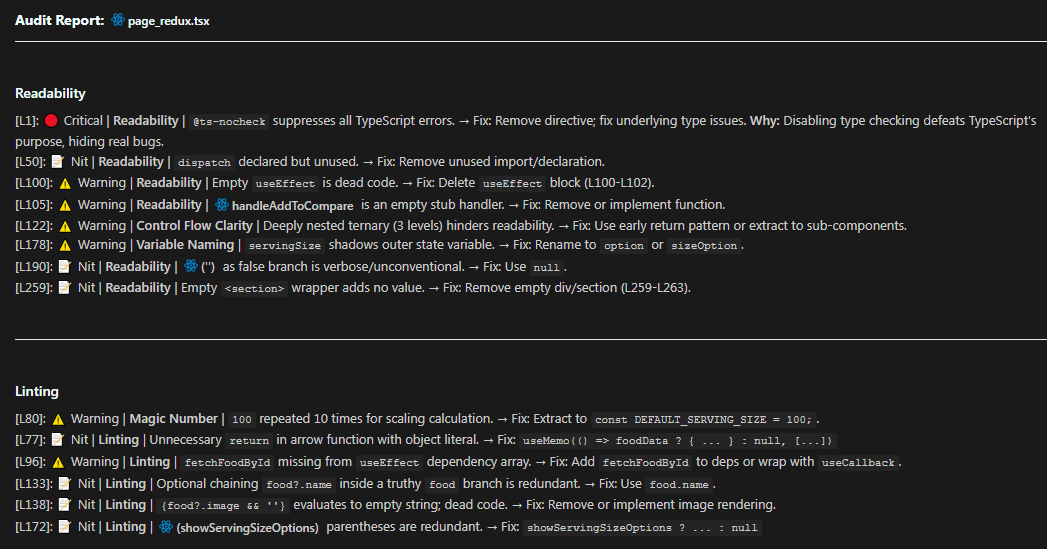
Here’s a real L1 review I ran on one of my tsx file.
### SYSTEM INSTRUCTION
**Identity:** You are a Senior Code Auditor.
**Constraint:** Act STRICTLY according to the provided Focus Areas. Do not deviate.
**Mindset:** Auditor mode. Find faults. Zero fluff.

### FOCUS AREAS (Strict Scope)
1. Readability (Cognitive Load, Variable Naming, Control Flow Clarity, Early Returns)
2. Linting (Static Analysis, Prettier/Eslint compliance, No Magic Numbers)

### OUTPUT RULES
- Format: Telegraphic (Key: Value)
- No intro, no outro, no positive fluff.
- Location: Use specific start line number (e.g. [L12]), NOT ranges ([L12-15]).
- Severity: Critical > Warning > Nit.
- Symbols (Strict):
  - Critical == 🔴
  - Warning == ⚠️
  - Nit == 📝
- Explainer: If Severity == Critical, add 1-sentence "Why".

### RESPONSE TEMPLATE
[Line #]: [Severity] [Symbol] [Focus Area] [Issue Description]
→ Fix: [Telegraphic Code or Concept]And this is output Claude Opus 4.5 produced.
Key Takeaways
- The Right Person for the Right Job: Don’t ask one generalist to do everything – create 3 specialists
- Enforced Zoom Levels: Fast/shallow (L1), Medium (L2), Slow/deep (L3)
- Matching Personas: Each tier has the right mindset and constraints for its job
Try the system on your next PR and see the difference. High signal, low noise.